

XbotGo Falcon

Le 11 migliori videocamere per pallamano per allenatori e club (2026)
Un passaggio splendidamente eseguito o un gol a sorpresa sono i momenti clou di ogni partita di pallamano. Nel momento in cui perdi simili istanti con la tua videocamera, sono persi per sempre.
Poiché la pallamano è uno sport veloce e ricco di azione, la videocamera che usi deve riflettere esattamente questo: un dispositivo che segua l'azione in modo fluido, registri immagini con chiarezza e colga quelle azioni lampo che a volte, se sbatti le palpebre, ti perdi.
In questo articolo abbiamo individuato con attenzione le migliori videocamere per la pallamano. Ciascuna di quelle elencate di seguito ha qualcosa da offrire alla comunità della pallamano, a partire dalle videocamere con tracciamento automatico basato su intelligenza artificiale, passando per i sistemi fissi per club installati nelle palestre, fino ad arrivare alle fotocamere mirrorless ad alte prestazioni.
Abbiamo ampliato questa guida per il 2026 includendo i sistemi che gli allenatori e i club di pallamano menzionano più spesso, comprese le piattaforme panoramiche e installate nelle arene che dominano la pallamano europea. Ora, immergiamoci nelle migliori videocamere per pallamano sul mercato.

Cosa richiede realmente la pallamano a una videocamera
La pallamano non è calcio con un campo più piccolo, e il problema delle riprese è profondamente diverso. Prima di confrontare i modelli, è utile conoscere i quattro vincoli in cui si imbatte qualsiasi videocamera per la pallamano.
Un campo al chiuso di 40 x 20 m, da porta a porta. Un campo da pallamano è abbastanza compatto da poter essere coperto da un'unica videocamera ben posizionata, ma la palla percorre l'intera lunghezza in pochi secondi. Un sistema che ruota troppo lentamente trascorrerà il contropiede guardando un pavimento vuoto.
L'illuminazione della palestra. La maggior parte della pallamano a livello di club si gioca sotto una luce mista fluorescente o a LED che è molto più debole della luce diurna. Questo è il motivo principale per cui i filmati deludono, ed è il motivo per cui la qualità del sensore e la gestione della scarsa illuminazione contano molto di più al chiuso rispetto agli sport all'aperto.
Corpi in mezzo. Il pubblico della pallamano siede vicino alla linea laterale. Filmare dal livello del suolo significa passare la partita a guardare le schiene delle riserve, quindi l'altezza di montaggio non è un optional.
Chi la sta azionando realmente? Un genitore vuole guardare la partita, non filmarla. Un allenatore vuole un'ampiezza tattica per vedere la disposizione delle linee dei 6 e dei 9 metri. Un club vuole che ogni partita sia filmata nello stesso modo senza dover rintracciare un volontario ogni fine settimana. Questi fattori spingono verso prodotti diversi, ed è per questo che l'elenco sottostante è raggruppato in base a questa domanda piuttosto che classificato in un'unica classifica lineare.

Se vuoi vedere come la logica di tracciamento sia ottimizzata specificamente per il gioco al chiuso, la pagina della videocamera per pallamano di XbotGo illustra la consapevolezza del campo, la stima della posa e la fluidità del contropiede per il campo di 40 x 20 m.
Le migliori videocamere per pallamano a colpo d'occhio
| Videocamera | Tipo | Richiede un operatore? | Ideale per |
|---|---|---|---|
| XbotGo Falcon | Tracciamento automatico con IA autonomo | No | Allenatori e club che vogliono una videocamera che riprenda ogni partita senza supervisione |
| XbotGo Chameleon | Supporto IA alimentato da telefono | No | Genitori e squadre che possiedono già un telefono di punta recente |
| Veo Cam 3 | IA panoramica, portatile | No | Club che desiderano il flusso di lavoro panoramico ampiamente utilizzato |
| Pixellot Air NXT | IA panoramica, portatile | No | Club e scuole che desiderano momenti salienti automatizzati |
| PIX4TEAM 2 | Supporto robotizzato per la propria videocamera | No | Chiunque possieda già una videocamera o un telefono degni di nota |
| Spiideo | Multi-videocamera installata nell'arena | No | Arene, campionati e federazioni |
| Hudl Focus | Videocamera IA montata nella struttura | No | Programmi che utilizzano già la piattaforma Hudl |
| Fujifilm X-H2S | Mirrorless | Sì | Foto nitide e slow-motion dalla linea laterale |
| Panasonic Lumix DC-G9 | Mirrorless | Sì | Foto in sequenza di tiri in salto e parate |
| Sony a6000 | Mirrorless | Sì | Principianti con un budget limitato |
| Insta360 X5 | Videocamera d'azione 360 | In parte | Re-inquadrare tutto ciò che hai perso, dopo la partita |
Videocamere per pallamano con IA automatica che possiedi e trasporti
Questi sono i sistemi che acquisti una volta, posizioni su un treppiede a bordo campo e lasci stare. Per la maggior parte dei genitori, allenatori e piccoli club di pallamano, la risposta giusta si trova in questo gruppo.
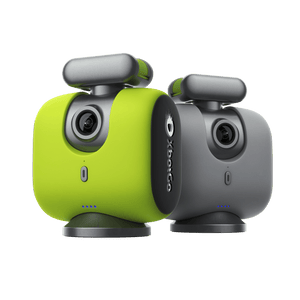
1. XbotGo Falcon — La migliore videocamera per pallamano in assoluto

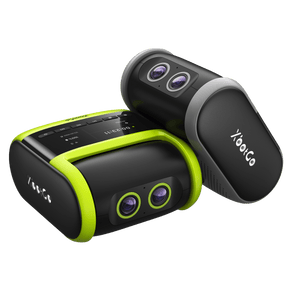
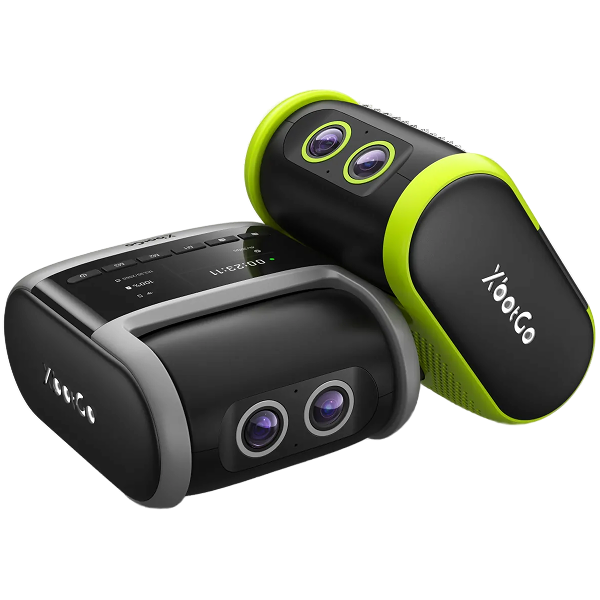
Il Falcon è la videocamera sportiva all-in-one 4K con IA di XbotGo ed è la scelta ideale per la pallamano perché elimina sia il cameraman che il telefono: la accendi, scegli la modalità sportiva e lei riprende.
Il tracciamento è ottimizzato per il gioco al chiuso. XbotGo descrive la logica della pallamano come una consapevolezza del campo ottimizzata per la superficie di 40 x 20 m, mantenendo la videocamera concentrata sull'azione della linea dei 9 metri anziché sul pubblico, con una stima della posa che si aggancia a schemi come il tiro in salto. Il suo sistema a due videocamere vede l'intero campo e i giocatori contemporaneamente, registrando in 4K nativo a 30fps senza ritagli, o in 1080p a 60fps per il rallentatore. La batteria dura circa 240 minuti e l'Handball Club de Leon è inserito tra i club che utilizzano XbotGo.
Pro
- Completamente autonomo — nessun telefono occupato su un treppiede per 60 minuti
- Tracciamento ottimizzato per il campo indoor di 40 x 20 m e l'azione sulla linea dei 9 metri
- 4K nativo a 30fps, più 1080p a 60fps per l'analisi al rallentatore
- Streaming live gratuito e modifica dei momenti salienti tramite IA, nessun abbonamento per le funzioni di base
Contro
- È richiesta una scheda microSD che non è inclusa nella confezione
- L'analisi IA è un componente aggiuntivo a pagamento in arrivo, non disponibile al lancio
Scopri XbotGo Falcon
2. XbotGo Chameleon — La migliore se possiedi già un telefono di punta

Se desideri catturare l'azione frenetica della pallamano senza assumere una troupe completa e possiedi già un iPhone o un Samsung recente, il Chameleon è la via d'accesso più economica. Trasforma il telefono che porti già con te in una videocamera sportiva tracciata dall'IA: il telefono fornisce l'obiettivo e la registrazione, mentre il Chameleon fornisce il coprocessore IA e la rotazione motorizzata che mantiene l'azione nell'inquadratura.
Montalo e lascialo seguire la partita. La sovrapposizione del tabellone segnapunti in tempo reale ScoreSync imprime il punteggio in corso nel filmato, un'autonomia di 8 ore copre una giornata di match o diverse sessioni di allenamento, e lo streaming live gratuito insieme a 20 GB di spazio di archiviazione cloud rendono la condivisione dei momenti salienti molto semplice. Due aspetti da considerare: la qualità video dipende da quella del tuo telefono e la registrazione 4K è disponibile solo nelle modalità per sport di squadra.
Pro
- IA intelligente che traccia automaticamente il gioco
- Sovrapposizione del tabellone segnapunti integrata tramite ScoreSync
- Lunga autonomia di 8 ore per intere giornate di match
- Streaming live gratuito e archiviazione cloud fino a 20 GB
Contro
- Richiede un telefono di punta compatibile, che determina la qualità dell'immagine
- È necessaria una buona illuminazione per ottenere filmati validi
Scopri XbotGo Chameleon
3. Veo Cam 3 — The Panoramic System Most Clubs Have Heard Of

Veo è il nome che emerge più spesso quando gli allenatori confrontano le opinioni online, e Veo commercializza direttamente la pallamano, inserendola tra gli sport supportati dalla Cam 3. Funziona diversamente da una videocamera pan-tilt: registra una vista fissa a 180° dell'area di gioco per l'intera sessione e poi utilizza l'IA per muovere una videocamera virtuale all'interno di quella registrazione, in modo che la "videocamera" non perda fisicamente mai un contropiede poiché ha catturato tutto in una volta.
Veo dichiara una batteria fino a 6,5 ore e la videocamera pesa circa 1.250 g. Lo streaming live è supportato. Il compromesso è il modello: Veo viene venduto come videocamera più un abbonamento continuativo alla sua piattaforma, quindi il costo continua a correre per tutto il tempo in cui la usi, e l'approccio panoramico distribuisce la risoluzione sull'intero campo anziché concentrarla sul pallone.
Pro
- Registra l'intera area di gioco a 180°, così non si perde nulla fisicamente
- La pallamano è ufficialmente supportata
- Lunga durata della batteria e streaming live
Cons
- Richiede un abbonamento continuativo alla piattaforma Veo
- La cattura panoramica distribuisce i dettagli su tutto il campo
4. PIX4TEAM 2 AI Auto-Follow Camera

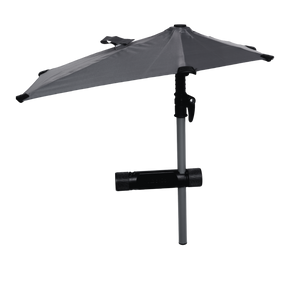
Il PIX4TEAM 2 risolve un problema diverso: invece di venderti una videocamera, ti vende il robot che punta la videocamera che già possiedi. Come mostra la foto sopra, l'unità trasporterà volentieri una videocamera o un telefono, muovendosi fisicamente per seguire l'azione.
Posizionala su un treppiede o montala saldamente, e si occuperà di inquadrare l'azione in tempo reale. Funziona sia al chiuso che all'aperto, coprendo sia le sessioni di allenamento che le partite competitive, e supporta più sport anziché solo la pallamano. Puoi trasmettere in streaming o registrare e rivedere in seguito, e più unità possono essere utilizzate insieme.
Pro
- Nessun bisogno di un operatore video, è completamente automatica
- Traccia automaticamente e crea momenti salienti in tempo reale
- Facile da caricare, condividere e archiviare i filmati
- Ben adatta alla copertura di sport di squadra e scolastici
Contro
- Per accedere a tutte le funzionalità, avrai bisogno di un abbonamento
- Strutturata attorno a una copertura a tutto campo, meno adattabile per riprese ravvicinate
5. PIX4TEAM 2 AI Auto-Follow Camera

Il PIX4TEAM 2 risolve un problema diverso: invece di venderti una videocamera, ti vende il robot che punta la videocamera che già possiedi. Come mostra la foto sopra, l'unità trasporterà volentieri una videocamera o un telefono, muovendosi fisicamente per seguire l'azione.
Posizionala su un treppiede o montala saldamente, e si occuperà di inquadrare l'azione in tempo reale. Funziona sia al chiuso che all'aperto, coprendo sia le sessioni di allenamento che le partite competitive, e supporta più sport anziché solo la pallamano. Puoi trasmettere in streaming o registrare e rivedere in seguito, e più unità possono essere utilizzate insieme.
Pro
- Tracciamento automatico completo tramite IA con controllo robotizzato dell'angolo
- Funziona bene sia per partite di pallamano indoor che outdoor
- Ti permette di continuare a usare una videocamera o un telefono che già possiedi
- Offre l'opzione di streaming live o registrazione
- Supporto per più videocamere
Contro
- Alcune funzioni avanzate richiedono un abbonamento separato
- Richiede un montaggio accurato e corretto per un buon funzionamento

Sistemi di videocamere per pallamano installati nelle palestre per club e arene
Questi non sono prodotti che porti in una borsa. Vengono installati nella palestra e filmano tutto ciò che accade al suo interno. Se il tuo club possiede o condivide una struttura permanente e desidera che ogni partita e ogni sessione di allenamento siano registrate senza che nessuno tocchi una videocamera, questa è la categoria da guardare.
6. Spiideo — Il migliore per arene, campionati e federazioni
Spiideo è la piattaforma più nativa per la pallamano in questo elenco. Installa videocamere 4K in modo permanente nell'arena e utilizza la sua tecnologia AutoFollow per produrre catture panoramiche e video automatizzati sia per le partite che per gli allenamenti, il che significa che la registrazione è semplicemente sempre disponibile anziché essere qualcosa che qualcuno deve ricordarsi di impostare.
Specificamente per la pallamano, Spiideo offre anche AutoData, un livello di statistiche generato dal video stesso, e cita l'Elverum Handball tra i club che lo utilizzano. La presenza a livello di federazione è reale: la Federazione islandese di pallamano è un caso studio pubblicato da Spiideo, e le videocamere Spiideo sono state testate alle finali della Celtic Cup nel 2026. Lo streaming live fa parte della piattaforma.
Il risvolto della medaglia è semplice: si tratta di un'installazione fissa basata su un abbonamento alla piattaforma, non di un acquisto che fai di martedì e usi di sabato. Il prezzo e l'ambito sono pensati per le organizzazioni, non per il singolo genitore.
Pro
- Videocamere 4K installate permanentemente con cattura panoramica AutoFollow
- Statistiche di pallamano AutoData generate dal filmato
- Collaudato a livello di federazione, inclusa la Federazione islandese di pallamano
- La registrazione è sempre disponibile sia per le partite che per gli allenamenti
Contro
- Richiede un'installazione permanente nell'arena
- Modello di abbonamento alla piattaforma mirato alle organizzazioni
7. Hudl Focus — Il migliore se il tuo programma utilizza già Hudl
Hudl Focus è una videocamera con intelligenza artificiale montata sulla struttura che traccia automaticamente il gioco e offre video in HD e live streaming da un'angolazione fissa. È disponibile in diverse varianti, tra cui Focus Indoor e Focus Flex, e i modelli da interni sono pensati esattamente per il tipo di palazzetto dello sport in cui si gioca a pallamano.
Il vero argomento a favore di Focus non è la videocamera isolata, ma l'ecosistema. Se i tuoi allenatori analizzano già i filmati, taggano le clip e condividono gli highlights all'interno di Hudl, Focus inserisce direttamente il filmato in un flusso di lavoro che tutti conoscono, senza che nessuno debba imparare una seconda piattaforma. Se il tuo programma non usa Hudl, questo vantaggio scompare in gran parte e l'installazione fissa diventa più difficile da giustificare.
Pros
- Modelli per campi da interni progettati per il montaggio in palestre e palazzetti dello sport
- Tracciamento automatico con IA più live streaming integrato
- I filmati arrivano direttamente nel flusso di lavoro di analisi di Hudl
Contro
- Montata permanentemente, quindi riprende una sola struttura
- Il valore dipende fortemente dall'utilizzo precedente della piattaforma Hudl
Videocamere manuali per la fotografia di pallamano e il lavoro sugli highlights
I sistemi automatici sono progettati per catturare l'intera partita. Se ciò che desideri realmente è una foto da incorniciare di un tiro in sospensione o un dettaglio in slow-motion della parata di un portiere, ti serve una videocamera con una persona dietro.
8. Fotocamera digitale Fujifilm X-H2S

La Fujifilm X-H2S non scende a compromessi in termini di velocità, chiarezza o prestazioni. Essendo una fotocamera mirrorless progettata per l'azione ad alta velocità, è una forte soluzione per gli allenatori di pallamano e i creatori di contenuti sportivi.
Può scattare fino a 40 fps, quindi non ti perderai un salto, un blocco o uno scatto in campo, e la stabilizzazione d'immagine integrata nel corpo mantiene i filmati puliti durante le sequenze intense. Il veloce autofocus traccia i giocatori fluidamente, e il video a 6.2K o il Full HD ad alta velocità ti permettono di rivivere i momenti fulminei in slow-motion. È costruita per resistere a riprese prolungate in ambienti interni ed esterni, comprese condizioni meteorologiche difficili.
Pro
- Registra movimenti rapidi fino a 40 fps
- Video in altissima risoluzione 6.2K più slow motion
- Ottimo autofocus per il tracciamento dei giocatori
- Costruita per durare con resistenza agli agenti atmosferici
Contro
- Prezzo più elevato, quindi gli utenti occasionali potrebbero non trovarne il valore
- Il corpo macchina è piuttosto pesante per un uso occasionale
9. Fotocamera Panasonic Lumix DC-G9

La Panasonic Lumix DC-G9 è una delle migliori videocamere per la pallamano se desideri immagini dettagliate e prive di sfocature. Progettata con in mente la fotografia sportiva e naturalistica, è veloce, nitida e stabile, caratteristiche che si adattano al movimento costante della pallamano.
Il suo sensore da 20.3 MP, il veloce autofocus e la stabilizzazione d'immagine catturano l'azione rapida con precisione. Lo scatto a raffica è particolarmente valido a 60 fps in modalità RAW, ideale per estrarre immagini fisse da azioni veloci, e gira video in 4K puliti e di qualità professionale. La G9 è relativamente piccola per essere un corpo mirrorless con controlli semplici, consentendoti di utilizzarla senza essere particolarmente tecnico. Trova un equilibrio tra potenza e facilità d'uso che la maggior parte degli allenatori e dei creatori di contenuti sportivi apprezza.
Pro
- Autofocus rapido e modalità raffica a 60 fps
- Registrazione 4K nitida con dettagli luminosi
- Il movimento sfocato è ridotto dalla doppia stabilizzazione d'immagine
- Leggera e facile da maneggiare
Contro
- Autonomia della batteria ridotta durante le registrazioni lunghe
- Nessun tracciamento IA integrato, a differenza dei sistemi automatici sopra citati
10. Fotocamera ibrida E-mount Sony a6000

Se stai cercando una fotocamera decente che non svuoti il portafoglio, la Sony a6000 rimane un classico a diversi anni dal lancio. Ha una solida reputazione per il veloce autofocus ed è compatta, quindi può catturare scatti nitidi e ricchi d'azione, il che le vale un posto nella copertura di sport come la pallamano.
Offre uno scatto continuo a 11 fps e un sensore APS-C da 24.3 megapixel che gestisce bene il movimento, in particolare con una buona luce. Registra anche video in Full HD, ideali per l'analisi di squadra, clip social o video di allenamento. È un'opzione leggera che le persone amano usare, rendendola una scelta eccellente per i principianti o per chiunque desideri risultati di qualità senza complicazioni. Potrebbe non offrire le funzionalità IA presenti nelle fotocamere più recenti, ma azzecca i fondamentali, e a volte è tutto ciò che conta.
Pro
- Economica e facilmente reperibile
- Solido scatto continuo a 11 fps
- Buona qualità d'immagine con un buon autofocus
- Un'ottima opzione di ingresso per la registrazione di sport
Cons
- Nessun video in 4K
- Meno funzionalità: niente tracciamento IA, niente stabilizzazione integrata nel corpo

L'opzione fai-da-te: cattura tutto, decidi dopo
11. Insta360 X5 — La migliore per ricreare l'inquadratura dopo la partita
L'Insta360 X5 è l'opzione che continua a emergere nelle community di allenatori e cineoperatori quando qualcuno non vuole acquistare un sistema sportivo dedicato. È una action camera a 360 gradi, quindi non traccia nulla durante la partita: registra semplicemente l'intera sfera fino a 8K a 30 fps e ti permette di scegliere l'inquadratura in un secondo momento nell'app.
Per un campo da pallamano di 40 x 20 metri questa è una proprietà genuinamente utile: montala una volta vicino alla linea di metà campo e qualsiasi angolazione esisterà nel file. La batteria è stimata per 208 minuti e la fotocamera è impermeabile fino a 15 metri, quindi la durata in una borsa da palestra non è un problema. Il costo è il tuo tempo: ricalibrare l'inquadratura di un'intera partita in clip utilizzabili è un lavoro di editing che una videocamera con tracciamento automatico avrebbe fatto per te.
Pro
- Registra tutto a 360 gradi, quindi nessuna angolazione viene mai persa
- Cattura fino a 8K a 30 fps con rielaborazione dell'inquadratura post-partita
- Lunga autonomia della batteria di 208 minuti e robusta struttura impermeabile
- Funziona anche come action camera per uso generale
Contro
- Nessun tracciamento automatico in tempo reale: ogni clip richiede una ricalibrazione manuale dell'inquadratura
- Il tempo di editing si accumula rapidamente nel corso di una stagione
Videocamere per la pallamano di cui le persone chiedono ma che non sono in questo elenco
Alcuni nomi ricorrono regolarmente nei forum degli allenatori e nelle ricerche di confronto. Vale la pena conoscerli e capire perché non sono raccomandati qui per la pallamano.
- Trace — un sistema automatizzato molto apprezzato, ma è pensato per il calcio all'aperto, il che lo rende poco adatto a un campo da pallamano al chiuso.
- BallerCam — progettata attorno ai campi da basket al chiuso. Il tipo di struttura è giusto, ma la logica dello sport non è ottimizzata per la pallamano.
- Antelope Camera Systems — effettivamente utilizzata nelle trasmissioni di pallamano professionistica, incluse configurazioni ad alta velocità, ma si tratta di infrastrutture di trasmissione per arene piuttosto che di qualcosa che un club acquista.
- Zone14 e TeamTV Sport — compaiono entrambi nei confronti tra videocamere automatiche, ed entrambi meritano un'occhiata se desideri opzioni panoramiche più portatili da valutare.
- DJI Osmo Pocket 3 — frequentemente consigliata per le riprese sportive generali. È eccellente per il lavoro a mano libera e da bordo campo, ma il suo tracciamento dei soggetti è pensato per le persone di fronte a un creator, non per uno sport di squadra giocato su un campo intero.

Come configurare una videocamera per la pallamano in palestra
La videocamera conta meno di dove la posizioni. Quattro cose fanno la differenza tra un filmato utilizzabile e una stagione di registrazioni sprecate.
Posizionati in alto. Montala più in alto possibile secondo quanto consente la sala, idealmente su un treppiede alto a bordo campo vicino alla linea di metà campo. Dal livello del pavimento riprendi le schiene delle riserve; dall'alto vedi la rotazione difensiva e la spaziatura delle ali, che è il filmato che un allenatore usa realmente.
Riprendi di lato, non dal fondo. Un'angolazione dalla linea di fondo appiattisce il campo e nasconde la struttura delle linee dei 6 e dei 9 metri. La posizione a bordo campo sulla linea di metà campo è lo standard per un motivo.
Rispetta l'illuminazione. Le palestre al chiuso sono più scure di quanto sembri. Se il tuo filmato è rumoroso, la soluzione è solitamente un sensore di qualità superiore o un'apertura più ampia, non un'impostazione di risoluzione più alta.
Controlla la memoria e l'alimentazione prima del fischio. Le videocamere che registrano su microSD necessitano di una scheda inserita e formattata in anticipo, e di una batteria che copra comodamente il riscaldamento più i due tempi più le interruzioni. Le partite di pallamano sono più corte del calcio, ma le giornate di torneo no.
Domande frequenti sulle videocamere per la pallamano
Ho bisogno di una videocamera speciale per la pallamano?
Non necessariamente. Tuttavia, un veloce autofocus, la stabilizzazione e le capacità di gestione del movimento di una fotocamera faranno una differenza enorme nel filmato. Ciò che si avvicina di più all'essere essenziale per la pallamano indoor è una discreta performance in condizioni di scarsa illuminazione e una posizione di montaggio sopraelevata.
Qual è il tipo di obiettivo fotografico migliore per gli sport di pallamano?
Punta a uno zoom 24-70mm o 70-200mm. Questo ti darà flessibilità e ti permetterà di fare primi piani senza essere nel mezzo dell'azione.
Una sola videocamera può coprire un intero campo da pallamano di 40 x 20 metri?
Sì. Un campo da pallamano è abbastanza piccolo da poter essere coperto da una singola videocamera ben posizionata, motivo per cui i sistemi a singola videocamera funzionano qui meglio di quanto facciano per il calcio a dimensione intera. Esistono due approcci: i sistemi panoramici come Veo e Pixellot catturano l'intera area in una sola volta e ritagliano l'immagine in seguito, mentre i sistemi pan-tilt come l'XbotGo Falcon seguono fisicamente l'azione. Entrambi funzionano; il panoramico garantisce che non si perda nulla, il pan-tilt concentra la risoluzione dove si trova effettivamente l'azione.
Le videocamere per la pallamano funzionano in palazzetti dello sport bui?
L'illuminazione interna è la principale variabile nella qualità dei filmati di pallamano. Ogni videocamera di questo elenco produrrà una registrazione utilizzabile in una sala normalmente illuminata, ma la qualità dell'immagine diminuisce man mano che la sala si fa più buia. Se la tua struttura è poco illuminata, dai priorità alla qualità del sensore e controlla i filmati di esempio da una sala simile prima di prendere un impegno.
Dove dovrei montare la videocamera su un campo da pallamano?
A bordo campo, all'altezza della linea di metà campo, montata il più in alto possibile secondo quanto consente la struttura. Quell'angolazione mantiene entrambe le porte e l'intera linea difensiva nell'inquadratura ed evita di riprendere attraverso gli spettatori e le riserve.
Le videocamere con IA per la pallamano richiedono un abbonamento?
Dipende dal sistema, e vale la pena verificarlo prima dell'acquisto perché cambia significativamente il costo totale. I sistemi basati su piattaforma come Veo, Pixellot e Spiideo sono strutturati attorno a un abbonamento continuo. Le videocamere XbotGo sono un acquisto una tantum, con registrazione di base, tracciamento e live streaming inclusi senza abbonamento — il livello
Posso fare il live streaming delle partite di pallamano?
Certo, la maggior parte delle videocamere sopra menzionate può essere utilizzata per lo streaming live o funziona con software di streaming come Restream o OBS, rendendo facile trasmettere in streaming su YouTube, Facebook o Twitch. Se desideri la strada più semplice, l'XbotGo Falcon trasmette su YouTube, Facebook e RTMP con un solo tocco e senza costi di streaming. Per una panoramica di dove viene trasmessa ufficialmente la pallamano, consulta la nostra guida ai migliori servizi di streaming per la pallamano.
Qual è la migliore videocamera per la pallamano per un principiante con un budget limitato?
La classica Sony a6000 è una potente opzione. È economica, facile da usare e offre comunque video e foto di bella qualità. Se preferisci non manovrare affatto una videocamera e possiedi già un recente telefono di punta, il Chameleon è la strada più economica per accedere al tracciamento automatico.
Quali sono gli svantaggi delle videocamere mirrorless per la pallamano?
Sono leggere e possono essere più veloci, ma le mirrorless lottano con l'autonomia della batteria e talvolta si surriscaldano se registrano per un periodo prolungato. Hanno anche bisogno di qualcuno che le sorregga per tutti i 60 minuti, motivo per cui esistono i sistemi automatici.
Conclusione
La migliore videocamera per la pallamano dipende da ciò che conta di più per te: automazione, qualità video, costo continuativo o portabilità. Ognuna delle videocamere che abbiamo trattato ha i suoi pro e contro, dal tracciamento automatico senza mani alla riproduzione in eccezionale slow-motion.
Se il tuo club possiede la propria sala e vuole tutto filmato per sempre, guarda a Spiideo o Hudl Focus. Se desideri una videocamera che puoi portare a trasferte e tornei senza doverla mai toccare durante una partita, l'XbotGo Falcon è la scelta più forte a tutto tondo per la pallamano, con il Chameleon come opzione a minor impegno se possiedi già un telefono di punta. E se desideri immagini fisse da incorniciare di tiri in sospensione piuttosto che il filmato dell'intera partita, uno dei corpi mirrorless ti servirà meglio di qualsiasi sistema automatico.
Che tu stia allenando la squadra, facendo live streaming o assemblando highlights, c'è un'opzione di qualità in questa guida per ogni configurazione e budget. Vuoi potenziare i tuoi contenuti di pallamano? Prendi la tua videocamera e inizia a riprendere come un professionista.
Vuoi confrontare i sistemi di tracciamento automatico anche per altri sport? Inizia con la nostra guida alle migliori videocamere con tracciamento automatico basato su IA per lo sport.