

- Soccer
As 7 Melhores Câmaras de Futebol para Gravar Jogos (2026)
O seu filho marca o golo da vitória enquanto está a lutar com a sua câmara, a tentar fazer zoom e a acompanhar a ação. Quando o consegue encontrar no visor, o momento ...
|
Câmara
|
Precisa de telemóvel?
|
Transmissão em direto gratuita? | Subscription for core featuresIdeal para | Ideal para |
|---|---|---|---|---|
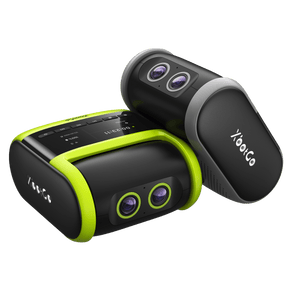
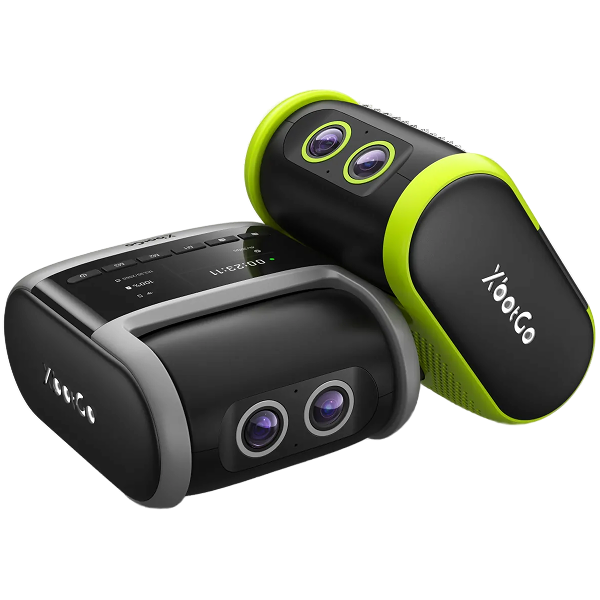
| XbotGo Falcon | Não — autónoma | Sim | Não | Desportos coletivos, treinadores, transmissão em direto |
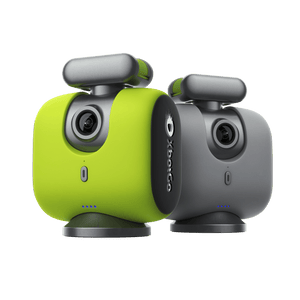
| XbotGo Chameleon | Sim — iPhone 12+ / Snapdragon 888+ | Sim | Não | Equipas com orçamento limitado |
| BallerCam | Sim — iPhone 13 Pro ou mais recente | Sim (720p) | Plano gratuito limitado a 20 horas de armazenamento na nuvem | Proprietários de iPhone, basquetebol e voleibol |
| Veo Cam 3 | Não — autónoma | Via plataforma | Sim — a análise requer subscrição | Clubes e academias com orçamento elevado |
| Pixellot Air | Não — autónoma | Via plataforma | Sim — as análises requerem um plano | Cobertura panorâmica de campo inteiro |
| SOLOSHOT3+ | Não — autónoma | Aplicação móvel | Não | Desportos individuais (golfe, ténis, surf) |
| OBSBOT PTZR | Webcam — precisa de computador | Via computador | Não | Espaços interiores, orçamentos reduzidos, configurações de transmissão |

Especificações Principais:


O que vem na caixa — e o que deve adicionar

Para quem é a Chameleon:
👉 Assista à análise aprofundada sobre a IA (el Jong)
A BallerCam pertence à BallerTV e adota a abordagem de montagem no telemóvel: o seu iPhone fornece o sensor, enquanto a estrutura adiciona movimento panorâmico e zoom por IA ao longo de um campo de visão de 180°. Inclui uma ventoinha de arrefecimento, que resolve o problema do acumular de calor que o iPhone sofre ao filmar durante longos períodos sob sol direto. Abrange futebol, futsal, basquetebol e voleibol de linha lateral.
Há dois aspetos a verificar antes de comprar. Primeiro, a resolução final que obtém é inferior à resolução de captura: a BallerCam grava em 4K para alimentar a panorâmica e o zoom da IA, mas o ficheiro descarregado é de 1080p e a transmissão em direto é de 720p. Segundo, o armazenamento na nuvem tem limites — o plano incluído cobre 20 horas e, a partir daí, passa para um plano pago. Para uma única época de uma só equipa pode ser suficiente; para um clube que filme várias equipas, os custos acumulam-se.
A compatibilidade está limitada ao iPhone 13 Pro e modelos mais recentes, pelo que os utilizadores de Android terão de procurar outra opção.
Especificações Principais:
Tecnologia Followcam
Qualidade de vídeo 4K HDR
Peso de 1,25 kg
6,5 horas de autonomia da bateria
Conectividade Wi-Fi / 5G
A Veo Cam é uma ferramenta inestimável para analisar o desempenho dos jogadores. A qualidade de vídeo 4K HDR garante uma gravação nítida, permitindo ver todos os pormenores durante a análise pós-jogo. A funcionalidade de automatização elimina a necessidade de os treinadores a operarem, permitindo que se concentrem totalmente no desenvolvimento técnico dos jogadores em clubes ou academias desportivas.
A bateria também se destaca: uma carga dura 6,5 horas, o suficiente para cobrir vários jogos completos. A câmara pode alternar para o modo de espera de baixo consumo quando está ligada mas não está a gravar, preservando a bateria. Embora o sistema de seguimento por IA seja bastante eficaz, a câmara Veo Cam pode, por vezes, perder algumas jogadas de movimento extremamente rápido.
Fator importante a considerar no orçamento: a plataforma de análise da Veo funciona por subscrição, pelo que o preço do equipamento não representa o custo total. Um clube com bons recursos e equipa técnica que vá efetivamente utilizar as ferramentas de análise poderá achar que o investimento compensa. Para uma única equipa a pagar do próprio bolso, o custo recorrente é o principal fator a ponderar.
Especificações Principais:
Qualidade de vídeo 4K com 12 MP
Conjunto de câmara dupla
Visão panorâmica de campo inteiro
Peso de 3,5 kg
Conectividade 3G/4G
Graças às suas duas lentes 4K de 12 MP, a Pixellot Air oferece cobertura panorâmica e seguimento por IA em tempo real, mantendo focadas mesmo as jogadas mais rápidas. A sua IA efetua recortes e movimentos panorâmicos dentro do enquadramento panorâmico para seguir a bola, sem mover fisicamente a câmara — segue o jogo com a suavidade de um operador de câmara experiente, captando o máximo de detalhes possível.
O sistema foi concebido para se adaptar rapidamente quando a intensidade do movimento aumenta. Identifica também automaticamente os momentos decisivos — golos, assistências e faltas — com base nas interações com a bola. Algumas das funcionalidades de análise de vídeo requerem subscrições mensais, o que representa uma limitação real para clubes com orçamentos reduzidos.
Especificações Principais:
Qualidade de vídeo 4K
Zoom ótico de 65x
2 a 3,5 horas de autonomia da bateria
Armazenamento microSD até 128 GB
Transmissão em direto via aplicação móvel
Desportos individuais — como golfe, ténis, natação ou ciclismo — são onde a câmara SOLOSHOT3+ faz mais sentido. Inclui um emissor (tag) impermeável e personalizável que rastreia o atleta a distâncias até 600 metros (2.000 pés). Capta o seu desempenho sem esforço enquanto atleta de pista, nadador ou ciclista, à medida que a câmara segue automaticamente os seus movimentos.
A clareza de vídeo é também vital para atletas individuais. A SOLOSHOT3+ possui resolução 4K combinada com um zoom ótico de 65x, proporcionando uma gravação em alta definição e rica em detalhes. A única grande desvantagem é o campo de visão reduzido — capta menos do cenário em redor do sujeito, e é por isso que se adequa melhor a desportos individuais.
Especificações Principais:
Resolução 4K Ultra HD a 60 fps
Zoom ótico de 5x
HDR e exposição automática
Controlo por gestos
1/2.8" CMOS sensor
Conectividade USB-C
A OBSBOT PTZR situa-se na gama mais acessível desta lista. Grava em 4K a 60 fps e oferece zoom ótico de 5x, proporcionando uma nitidez de imagem sólida para o preço.
Também suporta controlo por gestos — a câmara interpreta sinais com as mãos para fazer zoom ou ajustar o ângulo sem ter de premir botões, embora, na prática, os gestos possam necessitar de mais do que uma tentativa para serem reconhecidos. O HDR e o sensor CMOS mantêm o contraste de cores razoavelmente bem tanto em iluminação interior como exterior. Não oferece uma visão panorâmica.
A limitação importante: trata-se de uma webcam e não de uma câmara de campo. Precisa de estar ligada a um computador, o que a exclui da maioria das utilizações no exterior. É uma excelente opção se a sua configuração for em espaço interior e já envolver um portátil — um ginásio, um pavilhão ou uma estrutura de transmissão — mas uma má escolha se pretender colocar um tripé na linha lateral de um campo e afastar-se.
Não — mas vários dos sistemas mais conhecidos exigem uma, e esse é o maior custo oculto nesta categoria. O preço do hardware é o que vê na caixa; a taxa recorrente é o que realmente paga ao longo de uma época.
O mercado divide-se sensivelmente em três grupos:
A forma mais honesta de comparar: calcule o valor total ao longo de duas ou três épocas e não apenas o preço de etiqueta. Uma plataforma de subscrição pode silenciosamente custar mais do que a própria câmara. Se ninguém no seu clube vai sentar-se a utilizar ferramentas de análise avançadas, estará a pagar por algo que não vai abrir.
Uma ressalva justa: "sem subscrição" raramente significa "sem funcionalidades pagas no futuro". A XbotGo, por exemplo, indicou que as suas próximas ferramentas de Análise por IA (mapas de calor, movimento dos jogadores) serão um suplemento pago. A distinção fundamental é se a gravação, o seguimento e a transmissão — as razões pelas quais comprou a câmara — funcionam sem pagamentos mensais. No caso da Falcon e da Chameleon, funcionam.
O seguimento não é um problema único — uma bola a mover-se num campo de 100 metros e um nadador numa pista exigem coisas completamente diferentes de uma câmara. Eis como se dividem por desporto:
Campos de grande dimensão exigem um campo de visão amplo ou um seguimento panorâmico verdadeiramente rápido — idealmente ambos. O contexto do campo completo importa tanto quanto a bola, pois um treinador que analisa um golo quer ver a organização defensiva que o permitiu. Câmaras autónomas com lentes duplas (Falcon) ou arranjos panorâmicos (Pixellot) lidam melhor com esta situação. A elevação é mais importante do que se pensa: um tripé mais alto melhora drasticamente o que a IA consegue ver e o valor real da filmagem.
Os pavilhões cobertos são menores e mais bem iluminados, o que facilita o seguimento e alarga as opções. Os sistemas baseados em telemóvel funcionam muito bem aqui — o seguimento por número de camisola da Chameleon é uma funcionalidade focada no basquetebol, e a BallerCam foi concebida a pensar no basquetebol e voleibol. Um tripé de cerca de 2 metros na bancada costuma ser suficiente; não precisa de uma elevação de 4 ou 5 metros.
Neste caso, está a seguir um único atleta e não uma bola, pelo que uma câmara grande angular para equipas é a ferramenta errada. O seguimento por emissor (tag) personalizável, como na SOLOSHOT3+, foi feito exatamente para isto. O zoom ótico torna-se muito mais importante do que o campo de visão. As câmaras da XbotGo foram concebidas para desportos coletivos, pelo que para um golfista ou nadador a título individual não são a escolha natural.
Se os avós noutra cidade ou país forem o público, verifique como a câmara transmite antes de comprar. A Falcon transmite gratuitamente para o YouTube, Facebook ou qualquer destino RTMP com apenas um toque, e a transmissão em direto da Chameleon é gratuita sem taxas de subscrição recorrentes. A BallerCam transmite a 720p através da sua própria aplicação. A Veo e a Pixellot encaminham a transmissão através das suas plataformas, o que é fluido, mas fica associado a um plano pago. Tudo o que precisa de fornecer é a ligação à Internet no local do jogo.
Abaixo explicamos o que realmente importa no momento da escolha, para o ajudar a encontrar a melhor opção.
Ao selecionar uma câmara desportiva de seguimento automático, a qualidade de vídeo e a velocidade de seguimento são as prioridades absolutas.
Em primeiro lugar, a qualidade de vídeo é fundamental porque determina quão nítida e clara será a filmagem. Uma câmara com resolução 4K ou HD produz gravações detalhadas, garantindo que cada movimento é visível. Se a qualidade for baixa, grande parte das cenas parecerá desfocada devido à falta de focagem.
A velocidade de seguimento e a qualidade de vídeo andam de mãos dadas. Confirme se a câmara escolhida tem um rastreio rápido para acompanhar movimentos bruscos, especialmente em desportos com bola rápidos como o futebol e o basquetebol. Se uma câmara seguir o jogo devagar, a qualidade do vídeo deixa de importar — por muito bom que seja o sensor, a ação ficará fora do enquadramento. Por outras palavras, a imagem fica tremida ou incompleta, mesmo que tenha sido captada por uma câmara 4K.
Uma armadilha a ter em conta: verifique a resolução do ficheiro final que guarda, e não apenas a resolução que a câmara capta. Alguns sistemas gravam em 4K para dar à IA uma margem ampla para recortar, mas o ficheiro que realmente descarrega — e a transmissão a que a família assiste — é de 1080p ou 720p. Ambos os números são reais, mas respondem a questões diferentes.
Todas as câmaras de seguimento automático precisam de energia para funcionar. É uma vantagem se a câmara oferecer múltiplas opções de alimentação e não dependa exclusivamente da bateria interna. Alguns modelos carregam via painel solar ou podem ser ligados a uma tomada elétrica como fonte de reserva.
Se for dependente de bateria, prefira o tipo recarregável para evitar substituições periódicas. Garanta que a câmara tem autonomia suficiente para cobrir jogos longos sem o risco de se desligar a meio da ação.
Escolha uma câmara com uma instalação simples. Permitirá começar rapidamente assim que chegar ao local. Ninguém quer passar horas a ajustar definições quando podia estar a gravar o jogo.
Deve possuir um sistema de montagem prático, como tripés de encaixe rápido e suportes magnéticos. Além do posicionamento da câmara, considere modelos com menus claros para uma navegação rápida durante a preparação. Algumas câmaras possuem um ecrã tátil, permitindo configurar tudo com alguns toques.
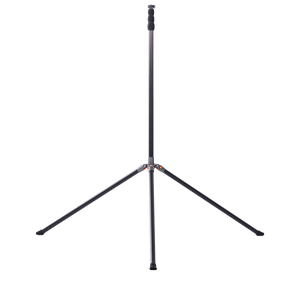
Quase todas as câmaras desta lista são vendidas sem tripé, e quase todas dependem criticamente de ter um bom suporte. A altura é o fator que determina o quanto do campo a IA consegue ver — uma câmara à altura do peito num campo de futebol perderá jogadores atrás de outros jogadores, e nenhuma quantidade de IA corrige um mau ponto de observação.
Como orientação geral: um tripé de cerca de 2 metros é adequado para um pavilhão de basquetebol ou linha lateral de voleibol. Para um campo inteiro de futebol ou futebol americano, vai querer subir consideravelmente mais — entre 3,5 a 4,5 metros —, motivo pelo qual a maioria dos fabricantes vende mastros elevados como acessório. Inclua isto no orçamento inicial em vez de o descobrir apenas após o primeiro jogo.
A portabilidade desempenha um papel importante quando o utilizador precisa de flexibilidade de transporte em diferentes ambientes. Uma câmara portátil minimiza os problemas se for um treinador ou jogador a atuar em mais do que um local. Para ser portátil, a câmara deve ser leve e compacta para facilitar o transporte.
A conveniência aumenta quando inclui suportes dobráveis, peças destacáveis e bolsas ou malas de transporte. Felizmente, a maioria das câmaras de seguimento automático inclui pelo menos alguns destes elementos.
Sim, valem a pena se deseja filmagens de qualidade sem ter de colocar alguém a filmar manualmente. A tecnologia elimina o erro humano associado a um voluntário atrás do tripé e mantém a ação no enquadramento de forma muito mais consistente. Além da automatização, obtém funcionalidades inteligentes como deteção de movimento, reconhecimento de sujeitos e movimentos panorâmicos automáticos que orientam a câmara para o jogador ou para a bola.
O tipo ideal de câmara para atividades desportivas deve ter gravação de alta velocidade, focagem automática rápida e excelente qualidade de imagem. Isto torna-a perfeita para registar cada detalhe em tempo real e acompanhar o ritmo acelerado em campo.
As câmaras de seguimento automático mudam as regras do jogo em desportos que envolvem campos grandes, jogo em equipa e movimentos rápidos e constantes. São desportos como futebol, basquetebol, râguebi, netbol, andebol, voleibol e hóquei.
Sim. A XbotGo Falcon e a Chameleon gravam, fazem seguimento automático e transmitem em direto sem qualquer taxa recorrente, e ambas incluem 20 GB de armazenamento gratuito na nuvem. A SOLOSHOT3+ e câmaras do tipo webcam como a OBSBOT PTZR também são compras únicas. Os custos de subscrição surgem principalmente em sistemas baseados em plataforma, como a Veo e a Pixellot, onde se paga mensalmente pelas ferramentas de análise e não pela câmara em si.
Sim. A XbotGo Falcon transmite gratuitamente para o YouTube, Facebook ou qualquer destino RTMP com transmissão num único toque, e a transmissão em direto da Chameleon é gratuita sem taxas de subscrição. Apenas precisa de uma ligação à Internet no local. Outros sistemas transmitem através de aplicações ou plataformas próprias, o que pode implicar uma menor resolução de transmissão ou a adesão a um plano pago.
Depende do tipo. Câmaras autónomas como a XbotGo Falcon, Veo Cam 3 e Pixellot Air têm os seus próprios sensores e não precisam de telemóvel. Sistemas com suporte para smartphone, como a XbotGo Chameleon e a BallerCam, utilizam o seu telemóvel como câmara — é uma opção mais económica, mas o telemóvel fica ocupado durante todo o jogo e a qualidade da imagem dependerá do modelo do dispositivo.
Tecnicamente sim, mas raramente vale a pena. As câmaras de seguimento automático fazem movimentos panorâmicos e de inclinação, pelo que necessitam de uma base estável — apoiar uma câmara numa mala ou varandim produz filmagens tremidas e confunde o seguimento da IA. Mais importante ainda, a altura é o que permite à IA ver todo o campo. A maioria destas câmaras utiliza uma rosca standard de 1/4", pelo que qualquer tripé de qualidade funciona; não precisa de adquirir obrigatoriamente o do próprio fabricante.
Em suma, escolher a melhor câmara de seguimento automático não consiste apenas em procurar a lista mais longa de funcionalidades. Da mesma forma, a melhor escolha não é necessariamente a câmara com a maior qualidade de vídeo ou a mais cara do mercado. Tudo se resume a encontrar um equipamento que atenda adequadamente às suas necessidades de gravação no seu local de utilização.
Se procura uma regra simples de decisão: comece por definir se está disposto a abdicar do seu telemóvel durante duas horas e se está disposto a pagar uma mensalidade todos os meses. Estas duas perguntas eliminam rapidamente a maior parte da lista.
Se a resposta a ambas for "não", uma câmara autónoma e sem subscrição como a XbotGo Falcon é o caminho mais direto. Se já possui um telemóvel recente e quer gastar menos, a Chameleon cumpre a mesma função com um investimento menor.
Seja qual for a sua opção, a câmara certa transforma as suas gravações numa verdadeira ferramenta de treino — uma forma de aprender, rever e dominar novas táticas — em vez de mais uma tarefa num dia de jogo.