

¿Puedes editar vídeos de XbotGo en la computadora?
Sí, puedes editar fácilmente videos de XbotGo en tu computadora con cualquier software de edición de video profesional . Nuestro sistema graba en formato MP4 estándar...
La mayoría de las guías sobre las mejores cámaras de voleibol para grabar empiezan hablando del tamaño del sensor y del rango de zoom. En un pabellón de instituto, ninguna de las dos cosas es tu problema.
Tus problemas son que el techo es bajo, las paredes están cerca y hay bastante menos luz de la que crees. Resuelve eso y una cámara modesta te dará imágenes que un entrenador puede aprovechar. Ignóralo y una cámara cara te dejará un plano borroso de la nuca de alguien.

El propio reglamento del voleibol pone el listón de la luz muy bajo. USA Volleyball exige solo 300 lux —unos 28 foot-candles— medidos a un metro del suelo, y las normas de instituto de la NFHS ni siquiera regulan la iluminación de los pabellones. Compáralo con el reglamento de la FIVB, que no admite menos de 2.000 lux en sus competiciones de máximo nivel. El pabellón donde juegan tus hijos puede ser legalmente unas siete veces más oscuro que una instalación profesional.
Esa diferencia explica por completo por qué la grabación sale con ruido. Congelar un remate exige una velocidad de obturación alta, esa velocidad exige luz, y nadie te ha prometido ninguna.
Luego está la geometría. La pista mide 18 por 9 metros y el balón sigue legalmente en juego hasta 15 pies por encima del suelo, pero la altura libre recomendada es de solo unos 23 pies. Tu cámara tiene que cubrir una caja muy alta desde un soporte bajo. Y lo que es peor: la NFHS pide únicamente 6 pies de espacio despejado fuera de las líneas de delimitación. En la mayoría de los pabellones es físicamente imposible retroceder lo suficiente para meter la pista entera en el encuadre.
No puedes retroceder. Tienes que subir.
| Cámara | Montaje | Ideal para | Coste recurrente |
|---|---|---|---|
| XbotGo Falcon | Portátil, con trípode | Clubes y familias que graban cada semana | Ninguno en las funciones básicas |
| Hudl Focus Indoor | Instalación fija | Centros con presupuesto y pabellón propio | Suscripción |
| Veo Cam 3 | Portátil, con trípode | Programas que ya están en el ecosistema Veo | Suscripción |
| Pixellot Air | Portátil, con trípode | Ligas que quieren retransmisiones automatizadas | Suscripción |
| GoPro o cámara de acción | Portátil, con trípode | Respaldo barato y sin florituras | Ninguno |
| Móvil en un trípode de iluminación | Portátil, con soporte | Partidos sueltos, presupuestos ajustados | Ninguno |
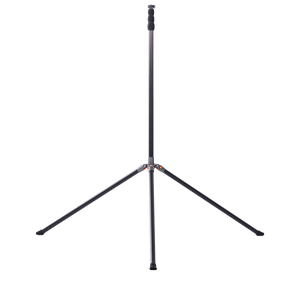
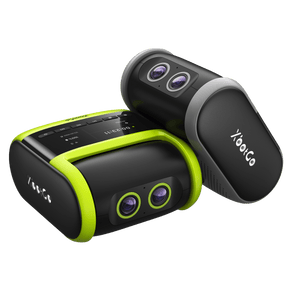
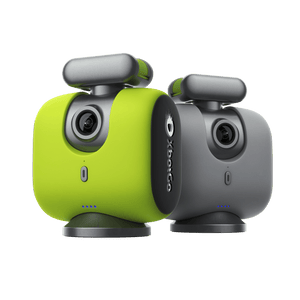
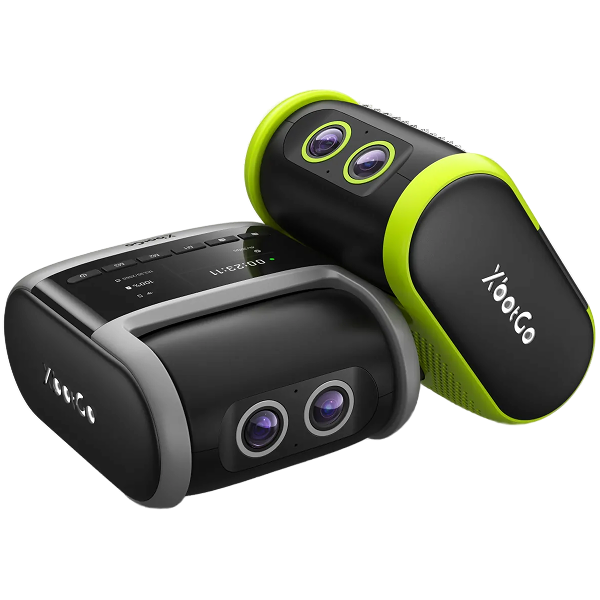
Si quieres altura sin tener que dejar a una persona pegada a la cámara, el XbotGo Falcon merece un vistazo. Su modo voleibol te guía en pantalla para colocarla: pon el trípode a 3 m (unos 10 ft) por fuera de la línea de banda, súbelo hasta 2,5 m (unos 8 ft) y gíralo para apuntar el objetivo a la línea central y cubrir toda la pista.

A partir de ahí puedes retransmitir en directo a YouTube, Facebook, TikTok o cualquier destino RTMP mientras sigue grabando, y superponer un marcador en directo para la familia que lo ve desde casa. La grabación, el seguimiento y la retransmisión no necesitan suscripción.

Dos advertencias honestas: la tarjeta microSD la pones tú, y la autonomía ronda las cuatro horas, es decir, calentamiento más partido, no una jornada entera de torneo sin recargar.
Se instala de forma fija cerca de la línea central y graba sin que nadie la maneje, volcando directamente en las herramientas de análisis de Hudl. Es el flujo de trabajo más cómodo si tu programa ya vive en ese ecosistema. Graba en HD y no en 4K, requiere una instalación y lleva suscripción, lo que la descarta para los clubes que alquilan horas de pabellón.
Una cámara gran angular fija, sin piezas móviles, que capta toda la pista y recorta después. Probada en fútbol y utilizable en una pista de voleibol, aunque la suscripción es el coste real y el encuadre se diseñó para campos mucho más grandes.
Pensada para grabar y retransmitir de forma automatizada, y muy usada por ligas que quieren cubrir todas las pistas sin poner a nadie a manejarlas. También va por suscripción, así que compara una temporada de cuotas con un pago único.
Barata, dura y sobrevive a que la tiren al suelo, algo que importa más de lo que imaginas. Las contrapartidas son reales: los modos 4K más angulares curvan los bordes de la pista con efecto ojo de pez, y muchos modelos se sobrecalientan y se apagan tras unos 30 minutos en 4K60. Lleva baterías de repuesto.
Es el montaje más habitual en cualquier pabellón, y funciona. La pega es que tu móvil se queda a 10 pies de altura durante dos horas. Como lo resumió un padre de una jugadora de voleibol: «Los iPhone están muy bien y son cómodos, pero yo quiero mi móvil durante el partido».

Esta es la parte que ninguna comparativa de cámaras te cuenta. Una pista de voleibol ocupa alrededor de la cuarentava parte de un campo de fútbol. Una sola cámara en un solo punto puede verla entera.
Eso cambia lo que deberías comprar. En fútbol, el seguimiento se gana el sueldo porque el balón recorre 100 metros y ningún encuadre fijo lo abarca. En voleibol, el balón casi nunca sale de una caja que podrías cubrir con un gran angular y un soporte alto. Un padre con experiencia en voleibol lo dijo sin rodeos: la cámara «no necesita seguir la acción»; lo que él quería eran resúmenes automáticos después.
Así que invierte primero en altura. Ponte por encima de la línea delantera y verás el juego de pies de la línea de zaga, que es de lo que va el vídeo de partido. Quédate a la altura de los ojos y tu líbero desaparecerá detrás de un bloqueador en cada jugada. Un truco que circula entre los padres de los clubes: un trípode de iluminación con muelle sube más que un trípode de cámara, cuesta menos y tiene una base estrecha con la que nadie tropieza en un pabellón lleno.

Aquí es donde los consejos se contradicen entre sí, y conviene hablar claro.
Para el seguimiento y el análisis del equipo, graba desde la línea de banda. Es lo que indica la propia guía de colocación del Falcon, y es el ángulo que muestra a la vez las formaciones y las rotaciones de los dos equipos. Además le viene bien a una cámara con seguimiento, porque la acción se mantiene centrada.
Para el vídeo de captación universitaria, graba desde la línea de fondo. Los coordinadores de captación piden siempre un plano centrado desde el fondo, a entre 8 y 10 pies de altura y en el lado de tu propio equipo, así que cambia de campo cuando lo hagan los equipos. Desde atrás, un entrenador puede leer los ángulos de carrera y la colocación defensiva que una vista lateral aplana.

Los dos son correctos. Simplemente son trabajos distintos, y una cámara en una sola posición no puede hacer los dos.
Los entrenadores quieren además algo que sorprende a mucha gente: vídeo sin editar. Como explicaba uno en una guía de captación de la JVA, los resúmenes enseñan la técnica, pero la grabación completa del partido enseña «cómo responden a los fallos y errores». Graba el partido entero, no solo las jugadas buenas.
Y un aviso que nadie escribe: tu cámara también graba tu banda. Ha habido entrenadores que han abierto un vídeo de captación y han oído a los padres criticando a las jugadoras durante un set entero.
Las mejores cámaras de voleibol para grabar no son las que llevan el sensor más grande. Los pabellones son oscuros por reglamento, los techos son bajos y no hay sitio para retroceder, así que la altura y un encuadre de pista completa siempre le ganan a las especificaciones.
Decide para qué van a servir las imágenes antes de comprar. El análisis de equipo te lleva a la línea de banda; la captación, a un plano centrado desde el fondo y a partidos completos sin editar. Sube la cámara, mete toda la pista en el encuadre y revisa el almacenamiento antes del primer saque. Y si al final te decides por el Falcon, merece la pena aprender cómo configurarlo para voleibol antes de tu primer partido: la altura del trípode es lo que más gente falla.