

Can You Edit XbotGo Video on Computer?
Yes, you can easily edit XbotGo videos on your computer using any professional video editing software. Our system records in standard MP4 format, ensuring complete com...
La plupart des guides sur les meilleures caméras pour filmer le volley commencent par la taille du capteur et la plage de zoom. Dans un gymnase de lycée, ni l’un ni l’autre n’est ton problème.
Tes vrais problèmes : le plafond est bas, les murs sont proches et l’éclairage est bien plus faible que tu ne le crois. Règle ça et une caméra modeste te donne des images qu’un entraîneur peut exploiter. Ignore-les et une caméra hors de prix te livrera une vue floue de l’arrière d’un crâne.

Le règlement du volley lui-même place la barre très bas côté lumière. USA Volleyball n’exige que 300 lux — environ 28 foot-candles — mesurés à un mètre du sol, et le règlement scolaire de la NFHS n’encadre même pas l’éclairage des gymnases. À comparer avec le règlement de la FIVB, qui impose au minimum 2 000 lux pour ses compétitions de haut niveau. Le gymnase de ton gamin a donc parfaitement le droit d’être environ sept fois plus sombre qu’une salle professionnelle.
Cet écart explique à lui seul les images pleines de bruit. Figer un smash demande une vitesse d’obturation élevée, une vitesse élevée demande de la lumière, et personne ne t’en a promis.
Ensuite, il y a la géométrie. Le terrain fait 18 mètres sur 9, et le ballon reste réglementairement en jeu jusqu’à 15 pieds au-dessus du sol — alors que la hauteur libre recommandée sous plafond n’est que d’environ 23 pieds. Ta caméra doit couvrir un volume tout en hauteur depuis un point bas. Pire : la NFHS ne demande que 6 pieds de dégagement au-delà des lignes de délimitation. Dans la plupart des gymnases, tu ne peux physiquement pas reculer assez pour faire tenir le terrain dans le cadre.
Tu ne peux pas reculer. Tu dois monter.
| Caméra | Installation | Idéale pour | Coût récurrent |
|---|---|---|---|
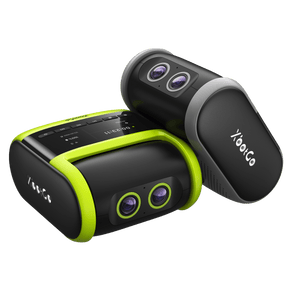
| XbotGo Falcon | Nomade, sur trépied | Les clubs et les familles qui filment chaque semaine | Aucun pour les fonctions de base |
| Hudl Focus Indoor | Pose fixe | Les établissements qui ont un budget et leur propre gymnase | Abonnement |
| Veo Cam 3 | Nomade, sur trépied | Les structures déjà dans l’écosystème Veo | Abonnement |
| Pixellot Air | Nomade, sur trépied | Les ligues qui veulent des diffusions automatisées | Abonnement |
| GoPro ou caméra d’action | Nomade, sur trépied | Une solution de secours, pas chère et sans fioritures | Aucun |
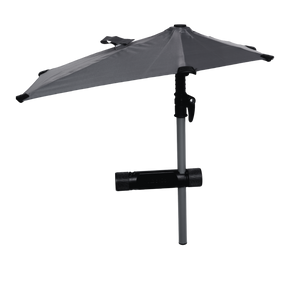
| Smartphone sur pied d’éclairage | Nomade, sur pied | Un match ponctuel, budget serré | Aucun |
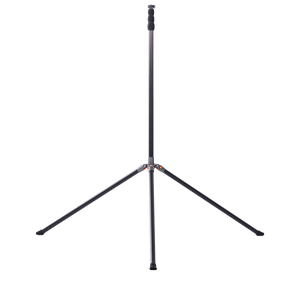
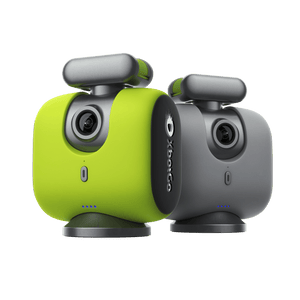
Si tu veux de la hauteur sans mobiliser quelqu’un pour tenir la caméra, le XbotGo Falcon mérite un coup d’œil. Son mode volley t’explique le placement à l’écran : pose le trépied à 3 m (environ 10 ft) de la ligne de côté, monte-le à 2,5 m (environ 8 ft), puis pivote-le pour viser la ligne centrale et couvrir tout le terrain.

De là, tu peux diffuser en direct sur YouTube, Facebook, TikTok ou n’importe quelle destination RTMP pendant qu’elle continue d’enregistrer, et incruster un tableau de score en direct pour la famille qui regarde depuis la maison. L’enregistrement, le suivi et la diffusion en direct fonctionnent sans abonnement.

Deux réserves, en toute honnêteté : la carte microSD n’est pas fournie, et l’autonomie tourne autour de quatre heures — l’échauffement plus un match, pas une journée entière de tournoi sans recharge.
Se fixe à demeure près de la ligne centrale et filme sans intervention, en alimentant directement les outils d’analyse de Hudl. C’est le flux de travail le plus fluide de cette liste si ta structure vit déjà dans cet écosystème. Elle enregistre en HD et non en 4K, exige une installation et impose un abonnement — ce qui l’élimine pour les clubs qui louent des créneaux de gymnase.
Une caméra grand-angle fixe, sans pièce mobile, qui capte tout le terrain et recadre ensuite. Éprouvée au football et utilisable sur un terrain de volley, même si l’abonnement est le vrai coût et que le cadrage a été pensé pour des terrains bien plus grands.
Conçue pour l’enregistrement et la diffusion en direct automatisés, elle a la cote auprès des ligues qui veulent couvrir chaque terrain sans y poster quelqu’un. Abonnement également : mets en balance une saison de frais récurrents et un achat unique.
Pas chère, costaude, et elle survit à une chute — ça compte plus que tu ne le crois. Les compromis sont bien réels : les modes 4K les plus larges courbent les bords du terrain en fisheye, et beaucoup de modèles surchauffent et s’arrêtent au bout d’environ 30 minutes en 4K60. Prévois des batteries de rechange.
C’est le montage le plus répandu dans les gymnases, et ça marche. Le hic : ton téléphone se retrouve à 10 pieds de haut pendant deux heures. Comme le résume un parent de joueuse : « Les iPhones, c’est génial et pratique, mais pendant le match, j’ai envie d’avoir mon téléphone sur moi. »

Voilà ce qu’aucun comparatif de caméras ne te dit. Un terrain de volley fait environ un quarantième d’un terrain de football. Une seule caméra, à un seul endroit, voit tout.
Ça change ce que tu dois acheter. Au football, le suivi se justifie parce que le ballon parcourt 100 mètres et qu’aucun cadre fixe ne le retient. Au volley, le ballon quitte rarement un volume qu’un objectif grand-angle sur un pied haut couvre sans problème. Un parent de joueuse expérimenté le dit sans détour : la caméra « n’a pas besoin de suivre » — ce qu’il voulait, c’était des temps forts générés automatiquement après le match.
Alors investis d’abord dans la hauteur. Passe au-dessus de la ligne avant et tu vois les appuis de la ligne arrière, ce qui est tout l’intérêt d’un film de match. Reste à hauteur d’yeux et ton libéro disparaît derrière un contreur à chaque échange. Une astuce qui circule chez les parents de club : un pied d’éclairage à ressort monte plus haut qu’un trépied photo, coûte moins cher, et sa base étroite ne fait trébucher personne dans un gymnase bondé.

C’est là que les conseils se contredisent, et autant le dire tout de suite.
Pour le suivi et l’analyse collective, filme depuis la ligne de côté. C’est ce que précise le guide d’installation du Falcon, et c’est l’angle qui montre d’un seul coup les dispositifs et les rotations des deux équipes. Ça arrange aussi une caméra à suivi, parce que le jeu reste centré.
Pour une vidéo de recrutement universitaire, filme depuis la ligne de fond. Les responsables du recrutement demandent systématiquement un plan centré derrière la ligne de fond, à 8 ou 10 pieds de haut, du côté de ta propre équipe — donc change de côté quand les équipes changent. De derrière, un entraîneur lit les angles de course d’élan et le placement défensif qu’une vue latérale écrase.

Les deux sont justes. Ce sont simplement deux missions différentes, et une seule caméra à une seule position ne peut pas faire les deux.
Les entraîneurs veulent aussi une chose qui surprend : des images brutes. Comme l’explique un guide de recrutement JVA, les montages de temps forts montrent la technique, mais un match complet montre « comment les joueuses réagissent aux fautes et aux erreurs ». Filme le match entier, pas seulement les beaux moments.
Et un avertissement que personne n’imprime : ta caméra enregistre aussi ce qui se dit de ton côté du terrain. Des entraîneurs ont ouvert un film de recrutement et entendu des parents critiquer des joueuses pendant un set entier.
Les meilleures caméras pour filmer le volley ne sont pas celles qui ont le plus gros capteur. Les gymnases sont sombres par règlement, les plafonds sont bas et il n’y a aucun recul possible — la hauteur et un cadre qui tient tout le terrain battent les fiches techniques à chaque fois.
Décide à quoi serviront les images avant d’acheter. L’analyse collective t’envoie sur la ligne de côté ; le recrutement t’envoie derrière la ligne de fond, plan centré, matchs complets et non montés. Monte la caméra en hauteur, fais entrer tout le terrain dans le cadre et vérifie ton stockage avant le premier service. Et si ton choix se porte sur le Falcon, prends le temps de voir comment le régler pour le volley avant ton premier match — la hauteur du trépied est ce que la plupart des gens ratent.