

- Soccer
Top 10 Most Popular Soccer Teams in the World 2026
Soccer captivates billions of fans worldwide, but which teams truly command the greatest global following? To answer that, we pulled the numbers that actually get meas...
Tous les parents de sportifs connaissent ce compromis : filmer le match ou le regarder. La caméra demande tellement d'attention que l'on n'est jamais vraiment présent — et l'on a toujours peur de rater le seul moment qui comptait vraiment.
Vous n'avez pas à choisir. Voici les techniques qui vous permettent d'obtenir des images nettes et regardables tout en profitant réellement du match.
Filmer à main levée est la source de la majeure partie de la frustration. Les joueurs changent de direction plus vite que vous ne pouvez faire un panoramique, les images sont tremblantes et vous passez le match les yeux fixés sur un écran au lieu de regarder votre enfant. La solution consiste à cesser d'être le caméraman.

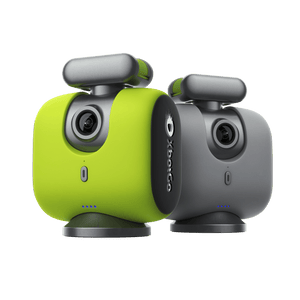
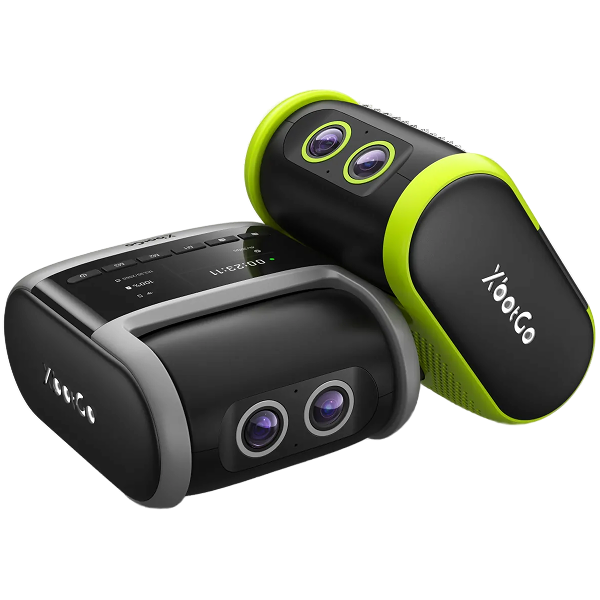
Le XbotGo Chameleon utilise votre téléphone comme caméra : le téléphone se glisse dans le support et enregistre, tandis que le Chameleon fournit le co-processeur IA et le moteur qui pivote pour suivre le jeu. Il couvre plus de 10 sports, se configure via Bluetooth, offre 8 heures d'autonomie par charge et, en mode basketball, peut verrouiller le suivi sur un joueur grâce à son numéro de maillot. La qualité d'enregistrement dépend de votre téléphone, avec la résolution 4K disponible dans les modes sports d'équipe.
Une seule question détermine quelle gamme vous convient : êtes-vous prêt à laisser votre téléphone sur un trépied pendant tout le match ? Sinon, le XbotGo Falcon élimine le besoin d'un téléphone — c'est une caméra autonome dotée de deux objectifs IA et d'une puce IA intégrée de 6 TOPS. Il enregistre en 4K/30fps natif (ou en 1080p60 avec le dernier micrologiciel pour des ralentis à mi-vitesse), résiste aux intempéries (certifié IPX5), offre environ quatre heures d'autonomie par charge et accepte une carte microSD jusqu'à 1 To (vendue séparément). Les nouvelles fonctionnalités ont tendance à arriver d'abord sur le Falcon.
Les deux gammes incluent 20 Go de stockage cloud gratuit et la diffusion en continu (streaming) en un clic sur YouTube, Facebook ou toute autre destination RTMP, sans abonnement pour l'enregistrement de base, le suivi ou le streaming. (L'analyse IA de XbotGo est annoncée comme une option payante supplémentaire à venir.)

Oui. Un smartphone récent monté sur un grand trépied en résolution 4K/30fps est tout à fait suffisant pour le partage en équipe et les clips de meilleurs moments. Le smartphone n'est pas le maillon faible — ce sont la chaleur, le stockage et la batterie.
La chaleur fait perdre des matchs entiers aux parents. Un smartphone exposé en plein soleil et enregistrant en continu finira par ralentir ou s'arrêter. Mettez-le à l'ombre, retirez sa coque pour qu'il dissipe mieux la chaleur et passez de 4K/60 à 4K/30.
Le stockage s'épuise plus vite qu'on ne le pense — un match complet en haute résolution peut atteindre plusieurs dizaines de gigaoctets. Vérifiez l'espace libre la veille au soir, enregistrez par mi-temps plutôt que dans un seul fichier ininterrompu, et effacez les matchs du week-end dernier avant de partir.
La batterie est le problème le plus facile à résoudre et le plus souvent oublié. Apportez une batterie externe (power bank) et branchez l'appareil à la mi-temps. Mieux encore : dédiez un ancien smartphone à cette tâche pour en faire une caméra de match dédiée — sans carte SIM, sans notifications — ce qui élimine la plupart de ces problèmes d'un seul coup. Pour en savoir plus, consultez notre guide sur la façon de filmer des matchs de football avec un smartphone.
Avant le match, repérez les éléments du site qui pourraient se trouver entre l'objectif et le jeu : têtes des spectateurs, grillages, abris de touche, arbres, plafonds bas en intérieur et reflets éblouissants. Cette vérification vous indique la hauteur nécessaire. Le milieu de terrain est la position par défaut — elle offre un cadrage constant, peu importe où se déroule l'action.
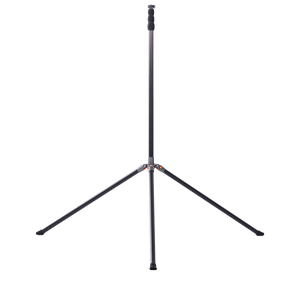
La hauteur a plus d'impact sur vos images que n'importe quel réglage du menu. À hauteur de chaise, vous filmez l'dos des autres parents ; au-dessus de la foule, vous filmez le match. Le minimum pratique se situe autour de 2,40 mètres (huit pieds), ce qui permet de passer au-dessus des spectateurs debout. La plupart des familles qui filment des matchs à onze se situent entre cette hauteur et environ 4 mètres (treize pieds), là où l'organisation de l'équipe devient visible et ne se limite plus seulement au ballon.
La hauteur pose un problème : le vent. Un grand trépied agit comme une voile, et une rafale qui le fait basculer met fin à votre enregistrement. Lester les pieds — la plupart des grands trépieds ont un crochet sous la colonne centrale exactement pour cela —, les écarter largement et rester à proximité du trépied pendant le match.
La bonne position dépend de la configuration de l'aire de jeu, et non du nom du sport :
| Sport / format | Où placer la caméra | Why it works |
|---|---|---|
| Football à effectif réduit (7v7) | Derrière un but, à 10-20 yards de recul | One end covers the whole field, and you get attacking play head-on |
| Football à grand terrain (9v9, 11v11) | Halfway line, as high as you can get, or diagonally off a corner | A full-size field is too long to shoot from one end without losing the far half |
| Filmer en se focalisant sur le gardien | Directly behind the middle of the goal, around 8–10 feet up | Almost all of a keeper's decisive moments happen inside that field of view |
| Basketball | Baseline at one end, elevated; switch ends at half-time | A court is short enough that one end frames the whole floor without heavy panning |
| Baseball et softball | On or beside the backstop, behind home plate, wide lens | Play is spread across a diamond in long pauses, so a fixed wide angle beats chasing the ball |
| Terrains intérieurs (volleyball, futsal, handball) | Sideline at mid-court, raised as far as the ceiling allows | Low ceilings cap your height, so the mid-court sideline recovers the coverage you lose |
Baseball deserves a note of its own, because the sport works against ball-following cameras. The action jumps between pitcher, batter, and a fielder fifty yards away. A fixed wide shot from the backstop captures all of it, while a tracking camera spends the game swinging between them. We go deeper in our guides to recording basketball games without a cameraman and recording a soccer game hands-free.
Plenty of tournaments restrict elevated setups and tripods — sometimes because they sell their own film, sometimes for crowd safety — and officials do ask people to take rigs down mid-game. Ask the organizer before you travel, and check whether your league restricts where footage can be posted. In most public US venues nothing stops you filming your own child's game, but venue and league rules still apply.
Resolution and frame rate. 4K at 30fps is the right default — high detail, but kind to storage, battery, and heat. Frame rate is a trade-off, not a "higher is better" dial: step down to 1080p if you want 60fps for slow motion. Most cameras, the Falcon included, offer the higher frame rate at 1080p rather than 4K.
Focus and shutter. Let auto-focus handle fast-moving players. For manual control, 1/1000 or above paired with a wide aperture works best for fast play, and ISO needs boosting indoors.
Low light. Evening kick-offs and dim gyms are where phone footage most often disappoints. Open the aperture wide, accept a slightly slower shutter than in daylight, and — the single most useful habit — shoot wide in 4K and crop afterwards rather than zooming live, which avoids the grain.
Stability and storage. Mount the camera on a gimbal or tripod; handheld shake ruins fast-paced footage. Save to an SD card and the cloud, so one failure doesn't cost you the memory. A quick pre-game checklist — battery charged, space free, settings confirmed — prevents most disasters.
Tracking that loses the game is the most common complaint about the whole category, and it is usually fixable. It rarely fails because the AI is confused about what a game looks like — it fails because of where the camera is standing and how it is set up.
Get height. At head height the camera sees a crowd of legs, a warm-up ball, and the game on the next field, all at roughly the same size. Raised above the spectators and angled down, it sees a field with players on it. If tracking wanders during warm-ups but settles at kick-off, height is almost always the cause.
Back off the touchline. Set up too close and passers-by fill the frame and outrank the actual game. A few extra yards trades a slightly smaller subject for tracking that stays put.
Check settings before the whistle. Select the correct sport mode — tracking logic differs between continuous play and stop-start sports — enter field dimensions if the app asks, and set recording quality deliberately rather than leaving last season's value.
Multi-field complexes are the hard case. Give the camera as little competing action as possible: raise the height, angle down onto your own field, and position so neighbouring games sit behind the camera rather than beside it. Both XbotGo tiers let you watch the live frame from your seat, which turns a lost ten minutes into a lost ten seconds.
Tag moments as they happen. The habit that saves the most time costs nothing: note the clock in your phone's notes app — "12:40 save, 31:05 goal" — and an hour of scrubbing becomes a two-minute job. A Bluetooth remote's marker button does the same without you looking away.
Name files before you upload. "2026-04-12 U12 v Riverside — full game" tells you everything in a year's time; "IMG_4471" tells you nothing.
Edit without overcomplicating it. iMovie, Filmora, and Adobe Premiere Pro all do the job, and Premiere's batch processing helps when a tournament weekend becomes reels for several families. Faster still: upload to the XbotGo cloud for auto-generated highlights you can trim in the app — full walkthrough in our guide to building highlight reels.
Share with an unlisted YouTube playlist. This is the free workflow most team parents settle on. YouTube absorbs the file size so nobody emails 40 GB around; unlisted keeps minors' footage out of public search while staying easy for a grandparent to open; and the playlist becomes the season archive by default. Keep two copies of anything you'd hate to lose — local card plus cloud. Streaming to family who can't attend is a related job: see our guide to livestreaming youth sports.
One caution if this is heading toward college recruiting: a recruiting reel is not a season archive. Coaches consistently ask for two to three minutes of best action, no music, no graphics beyond a name and class year, and full-game film available separately.