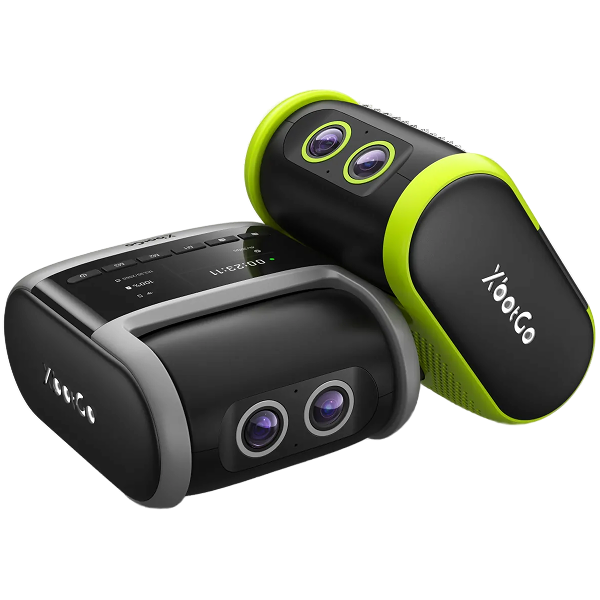


XbotGo Falcon
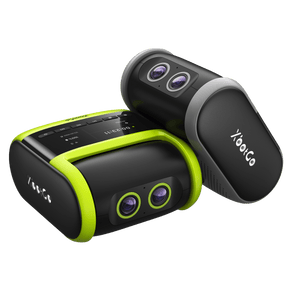
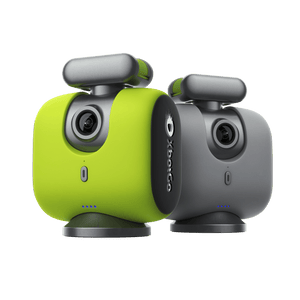
XbotGo Falcon All-in-One 4K Camera — just power on and play. Powered by XbotVision 3.0, it delivers high-speed, precise auto-tracking for soccer, basketball, hockey, and 10+ sports. The all-in-one app lets you stream live for free, edit with AI, and share highlights instantly. No subscriptions.
Learn More

As 6 Melhores Câmaras para Transmissão em Direto de Desportos (Guia de 2026)
Leve o Jogo a Todos - Em Direto!
A melhor câmara para a transmissão em direto de desportos é aquela que mantém toda a equipa em enquadramento sem que ninguém tenha de ficar atrás dela. Para os jogos de equipa, isso significa uma câmara de seguimento automático por IA; para os desportos de ação e clips de momentos altos, uma câmara 360 ou de ação é a ferramenta mais adequada. Este guia aborda ambas as opções e mostra exatamente o que mais precisa para colocar um jogo online.
As Melhores Câmara para Transmissão de Desportos em Direto num Relance
A forma mais rápida de reduzir a lista é perguntar a si próprio se vai filmar uma equipa ou uma pessoa.
| Câmara | Precisa do telemóvel? | Segue automaticamente toda a equipa? | Transmite para | Requer subscrição para ver as imagens? |
|---|---|---|---|---|
| XbotGo Falcon | Não — autónoma | Sim | YouTube, Facebook, RTMP, XbotGo Live, GameChanger | Não, para gravação base, seguimento e transmissão |
| XbotGo Chameleon | Sim — o telemóvel é a câmara | Sim | YouTube, Facebook, RTMP, XbotGo Live, GameChanger | Não, para gravação base, seguimento e transmissão |
| Insta360 X3 |
Para edição e direto
|
Não — capta tudo em 360°
|
Aplicação Insta360
|
Não
|
| DJI Osmo Action 5 Pro |
Para o direto
|
Não
|
Aplicação DJI Mimo
|
Não
|
| GoPro MAX |
Para o direto
|
Não
|
Aplicação GoPro
|
Não |
| Veo Cam 3 |
Não — autónoma
|
Sim, reenquadrado por software
|
Plataforma Veo
|
Plataforma Veo
|
XbotGo Falcon: A Escolha Autónomo para Transmitir Jogos de Equipas
Transmitir uns 90 minutos completos normalmente significa sacrificar um dos pais na linha lateral a segurar um telemóvel em vez de ver o filho a jogar. A Falcon elimina essa tarefa: é uma câmara autónoma — sem telemóvel agarrado a ela, sem nada para segurar. Coloque-a num tripé, escolha o modo de desporto, prima gravar e vá sentar-se.
Principais Características:
-
Transmissão em direto gratuita com um toque para o YouTube, Facebook, XbotGo Live, GameChanger ou qualquer destino RTMP (que é a forma como chega ao OBS)
-
Lentes de IA duplas que captam 4K nativo sem corte (cropping) ou junção; 4K/2.7K/2K até 30 fps, 1080p até 60 fps
-
Chipset de IA integrado de 6 TOPS que lida com o reconhecimento de alvos, estimativa de pose e previsão de trajetória em tempo real em mais de 10 desportos
-
Rotação de 360° com inclinação de 160° para cobrir toda a área de jogo a partir de uma única posição
-
Resistência às intempéries IPX5 — um sábado chuvoso não cancela a transmissão
-
Bateria de 240 minutos (9.600 mAh), pelo que o aquecimento mais uma partida completa cabem numa única carga
-
20 GB de armazenamento em nuvem gratuito mais edição automática de momentos altos por IA, pronta até arrumar o tripé
-
Sem subscrição para gravação principal, seguimento e transmissão — compra única
Orçamente separadamente um cartão microSD (obrigatório, não incluído) e um tripé. A Análise por IA (movimento dos jogadores, mapas de calor e intensidade) é um add-on anunciado para breve e não algo disponível hoje.
Ideal para: clubes, treinadores e equipas em deslocação que transmitem jogos completos; qualquer pessoa que não queira deixar um telemóvel num tripé de 4 metros (13 pés) durante duas horas. Conheça a XbotGo Falcon.
XbotGo Chameleon: A Câmara de Transmissão em Direto com IA Alimentada por Telemóvel
Se já possui um telemóvel de gama alta recente, poderá não precisar de um segundo sensor de câmara. A XbotGo Chameleon transforma esse telemóvel numa câmara desportiva com seguimento por IA: fornece o co-processador de IA, a rotação motorizada e o suporte para tripé, enquanto o seu telemóvel fornece a lente e efetua a gravação.
Principais Características:
-
Transmissão gratuita com um toque para o YouTube Live, Facebook Live, XbotGo Live, GameChanger e RTMP completo
-
Seguimento automático adaptativo para diferentes grupos etários, tamanhos de campo e formatos (7v7, 11v11, recintos Cobertos) — além de zoom automático inteligente nos momentos-chave
-
A resolução segue o seu telemóvel: 720p, 1080p ou 4K, com 4K em modos de desportos coletivos como futebol, basquetebol, hóquei no gelo e futebol americano
-
Controlo na aplicação enquanto funciona — pré-visualize o plano, ajuste o zoom, inicie ou pare a gravação
-
20 GB de armazenamento em nuvem gratuito mais edição por IA que deteta arrancadas, remates e roubos de bola para criar clips de momentos altos
-
Duração de funcionamento de 8 horas, comando Bluetooth incluído na caixa, sem subscrição para o seguimento e gravação de base por IA
Veja como é fácil configurar e iniciar a transmissão em direto com o seguimento inteligente por IA.
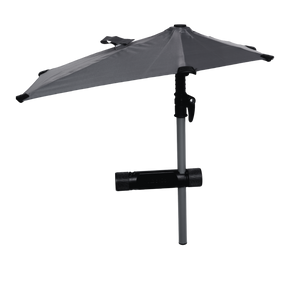
Alguns detalhes específicos antes de escolher este nível: a Chameleon liga-se por Bluetooth, pelo que a internet da sua transmissão vem do telemóvel. O seguimento de números de camisola e a Edição Automática por IA cobrem atualmente o modo de Basquetebol, com mais desportos planeados. O intervalo de inclinação é de mais ou menos 15 graus, e em caso de chuva forte é necessário o acessório separado Weather Guard Umbrella. Os modos de desportos individuais como ténis e pickleball utilizam HD otimizado para um melhor seguimento, e a gravação em iOS desce para 720p/1080p enquanto a monitorização em direto está ativa.
Veja a transmissão em direto por IA da Chameleon num jogo de desporto real — a seguir a ação sem mãos.
Ideal para: pais, atletas e equipas com um orçamento mais apertado, desportos de pavilhão e basquetebol em particular.
Câmara de Ação Insta360 X3

Principais Características:
-
Vídeo 5.7K em 360°
-
Estabilização FlowState
-
Transmissão em direto em 360° ou modo plano
-
Reenquadramento com edição por IA
-
Impermeável até 10 metros
A X3 capta tudo à sua volta, para que nunca tenha de se preocupar com o local para onde a câmara está apontada — filme primeiro, reenquadre depois, ou transmita em direto toda a cena e deixe os espetadores explorá-la em tempo real. Filme, edite e vá em direto inteiramente a partir do seu telemóvel; é impermeável logo após retirar da caixa, pelo que a chuva e as transmissões junto à piscina não causam problemas.
Ideal para: desportos de ação, aventuras ao ar livre e qualquer pessoa que pretenda liberdade criativa em detrimento de uma cobertura de equipa sem mãos.
Câmara DJI Osmo Action 5 Pro

Principais Características:
-
Vídeo 4K a 120 fps para imagens suaves e detalhadas
-
Estabilização HorizonSteady
-
Ecrãs táteis frontal e traseiro
-
Direto através da aplicação DJI Mimo
-
Impermeável até 18 m
O sensor maior aguenta-se onde a maioria das câmaras de ação fica granulada — treinos noturnos com pouca luz, jogos ao amanhecer — e 4K a 120 fps mantém os sprints e saltos livres de desfocagem. Ir em direto significa abrir a aplicação DJI Mimo; sem cabos, sem equipamento extra.
Ideal para: clips de coaching a partir da linha lateral e documentação de treinos em que exige detalhes de nível profissional num corpo de bolso.
Câmara de Ação GoPro MAX

Principais Características:
-
Grava em 360° (resolução 5.6K)
-
Modo HERO para planos clássicos
-
Estabilização HyperSmooth
-
Transmite em direto em 1080p
-
Áudio imersivo com seis microfones
Duas câmaras numa: captação a 360° num momento, enquadramento clássico GoPro no modo HERO a seguir, com HyperSmooth em todo o processo. Transmita em direto diretamente a partir da aplicação em 1080p, e os seis microfones captam tudo, desde o ressalto de uma bola até à reação na linha lateral.
Compromissos: os ficheiros 360 aumentam o tempo de edição e a autonomia da bateria é curta.、
Ideal para: captação flexível e divertida onde quer desfrutar do momento presente.
Veo Cam 3

Principais Características:
-
Transmissão em direto via Wi-Fi, Ethernet ou SIM 4G/5G
-
Vista panorâmica de 180° em 4K HDR
-
Upload instantâneo para a nuvem + marcadores de momentos altos
-
Construção robusta para condições climatéricas adversas (–10 °C a 45 °C)
-
Até 4,5 horas de autonomia da bateria
Monte-a na linha do meio-campo, prima "Go Live" e afaste-se para treinar a sério — a IA segue a bola ao longo do campo de 180° sem ninguém a vigiar a câmara, transmitindo por Wi-Fi, Ethernet ou através de um cartão SIM caso a internet do seu clube seja instável. Alguns utilizadores referem que roda com demasiado entusiasmo em desportos sem bola.
Preveja o custo de funcionamento: a Veo afirma que é necessária uma subscrição ativa para cada câmara para visualizar e analisar as gravações no Editor Veo, pelo que a taxa da plataforma continua a somar-se ao hardware.
Pode Transmitir em Direto para o GameChanger?
Sim. Se a sua equipa já regista pontuações e transmite no GameChanger, pode alimentar uma câmara XbotGo nessa mesma transmissão utilizando a opção de Câmara Externa do GameChanger. De acordo com o guia de suporte do GameChanger, são suportados três dispositivos — o Falcon, o Chameleon e o Sports Gimbal — com a aplicação XbotGo na versão 4.4.7 ou superior.
Defina a Resolução para 1080p Antes de Ir em Direto
O GameChanger limita as câmaras externas a 1080p e afirma que o vídeo transmitido acima de 1080p não será transmitido nem gravado. A Falcon filma em 4K nativo, pelo que deve selecionar 1080p ou inferior na aplicação XbotGo antes do pontapé de saída — caso contrário, poderá chegar ao fim do tempo regulamentar sem nada guardado. Como o sinal chega via RTMPS, todos os controlos de imagem encontram-se na aplicação XbotGo, e não no GameChanger.
Como Iniciar a Transmissão
-
No GameChanger, escolha a sua equipa, abra o separador do calendário (Schedule) e selecione o evento.
-
Prima Gravar Vídeo (Record Video), concedendo permissão para a câmara e o microfone na primeira vez.
-
No ecrã de pré-visualização, toque em Câmara Externa (External Camera) na parte superior.
-
Defina o seu público, escolha se pretende partilhar com o seu adversário e, em seguida, toque em Continuar para a Configuração da Câmara Externa (Continue to External Camera Setup) — certifique-se de que o dispositivo XbotGo está ligado primeiro.
-
Toque em XbotGo para saltar para a aplicação XbotGo e ligar-se à câmara (e ao Wi-Fi, se o estiver a utilizar).
-
Inicie a transmissão em direto na aplicação XbotGo e aceite a ligação do GameChanger quando solicitado.
-
Para terminar a transmissão, volte à aplicação XbotGo e toque no ícone de vídeo em direto — a transmissão não é interrompida a partir do lado do GameChanger.
Na Falcon, a transmissão para o GameChanger utiliza dados móveis por predefinição. Para utilizar o Wi-Fi, configure-o primeiro na aplicação XbotGo (definições em direto → Definições de Vídeo e Rede → Selecionar Rede Wi-Fi) e, em seguida, abra o GameChanger. A XbotGo publica a sua metade do processo no seu próprio guia de transmissão em direto para o GameChanger. Uma transmissão pública no YouTube ou Facebook é uma ação distinta de um toque — não está a escolher uma ou outra para toda a época.
O Que Mais Precisa para Transmitir um Jogo em Direto
A câmara costuma ser o menor dos problemas no dia do jogo. Estes quatro elementos decidem se a transmissão se mantém ativa:
- Uma ligação que resista a 90 minutos. A maioria dos campos não tem Wi-Fi, o que obriga a recorrer a um hotspot de telemóvel ou a um cartão SIM na câmara. Um jogo completo consome vários gigabytes, por isso verifique o seu pacote de dados. Se o espaço tiver Wi-Fi, teste-o a partir do canto onde a câmara vai ficar colocada, e não a partir dos balneários.
-
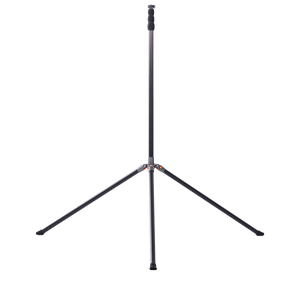
Altura, e não apenas um tripé. Uma câmara de seguimento automático à altura do peito passa o jogo a filmar costas. Cerca de 3 a 4 metros (10 a 13 pés) é o que separa imagens taticamente analisáveis de imagens onde a bola desaparece constantemente atrás dos jogadores. Um tripé de 13
-
Um local para guardar as imagens. Transmitir e gravar são tarefas diferentes. As câmaras autónomas gravam para um cartão microSD enquanto transmitem, o que o salva quando a ligação cai. Verifique se o cartão está incluído, bem como a capacidade e a classe de velocidade exigidas pela câmara.
- Energia para mais tempo do que pensa. Os aquecimentos, os atrasos, os prolongamentos e a caminhada de regresso consomem todos a mesma bateria. Calcule o tempo de funcionamento face ao seu dia mais longo realista e traga um power bank para qualquer equipamento baseado em telemóvel.
Ainda a ponderar o hardware? A nossa compilação de câmaras de seguimento automático por IA para desporto compara os sistemas de seguimento de forma mais aprofundada.
Porque é que a Transmissão em Direto é Importante para o Desporto
- Instant sharing. Sem esperas para editar e carregar — um toque e o mundo está a assistir consigo.
- Novas formas de crescer e faturar. O YouTube, o Facebook e o Twitch facilitam o alcance de mais adeptos e permitem até monetizar à medida que avança.
- Todos incluídos. Distant grandparents, injured teammates, and college scouts all get a front-row seat.
- Nada se perde. As transmissões guardadas na nuvem sobrevivem a cartões SD avariados, prontos para serem reouvidos anos mais tarde.
.
Perguntas Frequentes
Qual é a melhor câmara para transmitir desportos em direto?
Para desportos coletivos, a melhor câmara é uma câmara autónoma de seguimento automático por IA, como a XbotGo Falcon, porque enquadra a ação sem que ninguém a opere e transmite gratuitamente para o YouTube, Facebook e RTMP. Para desportos de ação, ciclismo ou treino individual, uma câmara 360 ou de ação como a Insta360 X3, GoPro MAX ou DJI Osmo Action 5 Pro é a opção mais adequada.
Que câmaras profissionais são melhores para transmissões desportivas?
A produção de transmissão completa utiliza configurações multicâmara com misturadores e operadores dedicados. Para a transmissão ao nível de clubes, escolas e camadas jovens, uma única câmara de seguimento automático por IA num tripé alto oferece praticamente a mesma experiência de visualização sem necessitar de uma equipa técnica, razão pela qual se tornou o padrão para a transmissão amador.
Preciso de uma subscrição para transmitir desportos em direto?
Depende da câmara. As funções básicas de gravação, seguimento e transmissão em direto da XbotGo funcionam sem subscrição através de uma compra única. A Veo indica que é obrigatória uma subscrição ativa para cada câmara para visualizar e analisar as gravações no seu Editor. Verifique sempre se a taxa da plataforma é independente do hardware antes de comprar.
As câmaras XbotGo podem transmitir para o GameChanger?
Sim. O guia de suporte do GameChanger lista a XbotGo Falcon, a Chameleon e a Sports Gimbal como câmaras externas suportadas, com a aplicação XbotGo na versão 4.4.7 ou superior. Na aplicação GameChanger, abra o evento, toque em Gravar Vídeo, escolha Câmara Externa, toque em XbotGo e conclua a ligação na aplicação XbotGo. Termina a transmissão a partir da aplicação XbotGo, e não do GameChanger.
Que resolução devo utilizar para uma transmissão no GameChanger?
1080p ou inferior. O GameChanger suporta uma resolução máxima de transmissão de 1080p para câmaras externas e indica que o vídeo transmitido acima de 1080p não será transmitido nem gravado. Embora a Falcon filme em 4K nativo, defina a aplicação XbotGo para 1080p ou inferior antes de ir em direto.
De que ligação de internet preciso para transmitir um jogo em direto?
Uma ligação Wi-Fi estável é o ideal. Onde os campos não têm Wi-Fi, um hotspot de telemóvel ou um cartão SIM na câmara funcionam ambos, mas transmitir um jogo completo pode consumir vários gigabytes de dados. Teste o sinal a partir do local exato onde a câmara vai ficar, e não a partir dos balneários.
Uma câmara pode transmitir em direto e gravar ao mesmo tempo?
Sim, na maioria das câmaras desportivas dedicadas. A XbotGo Falcon grava para um cartão microSD enquanto transmite, pelo que uma quebra de ligação faz perder o fluxo em direto, mas não as imagens do jogo. O cartão é obrigatório e não vem incluído na caixa.
Em Conclusão
Filmar uma equipa, a partir de uma posição fixa, durante toda uma época? Uma câmara autónoma de seguimento automático ganha o seu lugar. Filmar uma pessoa, em movimento, de perto? Uma câmara de ação ou 360 servir-lhe-á melhor.
A XbotGo Falcon foi concebida para uma transmissão em direto inteligente, fiável e sem mãos — vá em direto, alcance mais pessoas e nunca mais perca um único momento.