

- Soccer
Melhores Sites e Serviços de Streaming de Futebol em 2026
«Serviço de streaming de futebol» significa duas coisas completamente diferentes consoante quem pergunta. Se quer ver a Premier League, a Liga dos Campeões ou a Liga M...
O seu filho marca o golo da vitória enquanto está a lutar com a sua câmara, a tentar fazer zoom e a acompanhar a ação. Quando o consegue encontrar no visor, o momento já desapareceu para sempre. Parece-lhe familiar?
Não está sozinho. Milhares de famílias ligadas ao futebol enfrentam a mesma escolha todos os fins de semana: assistir ao jogo ou filmá-lo. A boa notícia é que já não tem de escolher. Uma geração de câmaras de futebol com inteligência artificial trata agora dos movimentos panorâmicos, do zoom e do enquadramento de forma autónoma, para que um pai possa estar na linha lateral e assistir realmente ao jogo, enquanto a câmara faz a gravação.
Este guia aborda os sete sistemas de câmaras de futebol que vale a pena considerar em 2026 — o que cada um faz realmente, a quem se destina e onde residem as verdadeiras diferenças. Se tem procurado a melhor câmara de vídeo para gravar jogos de futebol, a resposta honesta mudou: a melhor câmara para gravar jogos de futebol é agora, habitualmente, um sistema de seguimento automatizado em vez de uma câmara de vídeo tradicional, porque filmar um jogo inteiro à mão é a parte para a qual ninguém tem tempo.
| Câmara | Como faz o seguimento | Precisa de telemóvel? | Custo contínuo | Melhor para |
|---|---|---|---|---|
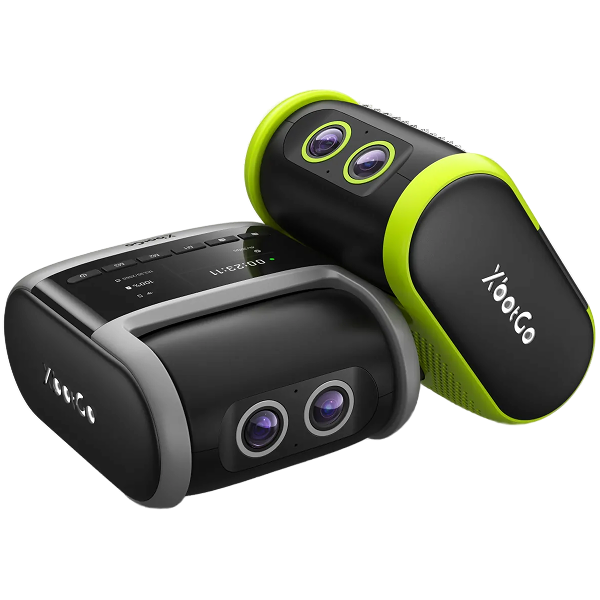
| XbotGo Falcon | A lente motorizada segue fisicamente a jogada, em direto | Não — autónoma | Sem subscrição para gravação principal, seguimento e transmissão | Clubes, treinadores e equipas de competição que filmam todos os jogos |
| XbotGo Chameleon | O suporte motorizado roda o telemóvel para acompanhar a jogada | Sim — o telemóvel é a câmara | Sem subscrição para gravação principal, seguimento e transmissão | Famílias que já possuem um telemóvel topo de gama recente |
| Trace | Lente grande angular fixa, seguimento de imagem integrado no software após o jogo | No | Subscrição; a câmara é alugada e devolvida | Pais que querem principalmente que um jogador seja seguido |
| Veo Cam 3 | Lente dupla fixa que grava o campo inteiro, vista gerada posteriormente | No | Subscrição anual da plataforma | Clubes que pretendem marcação de eventos e análise integradas |
| Pixellot Air NXT | Matriz de câmara dupla de 12MP, a inteligência artificial faz a panorâmica e o zoom dentro do panorama | No | Subscrição da plataforma | Ligas e recintos que transmitem muitos jogos |
| BallerCam | Lente grande angular num iPhone, a inteligência artificial faz a panorâmica e o zoom no software | Sim — apenas iPhone 13 Pro ou mais recente | Atualizações de armazenamento na nuvem vendidas em separado | Treinadores com um iPhone suplente que pretendem controlar o zoom |
| Reeplayer | Acompanhamento automático por IA com conectividade celular integrada | No | Aquisição de hardware e um plano de serviço obrigatório | Clubes a transmitir a partir de campos sem Wi-Fi |
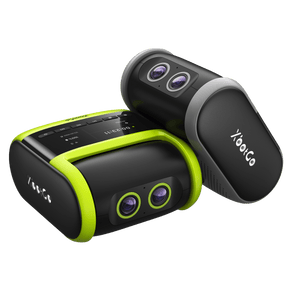
Se quiser manter o telemóvel no bolso, a Falcon é a escolha ideal. É totalmente autónoma: basta montá-la, ligá-la e ela grava e faz o acompanhamento sozinha, sem necessidade de operador de câmara na linha lateral.
O que a diferencia é o facto de rodar fisicamente. Um sistema de câmara dupla vigia o campo inteiro e os jogadores em simultâneo, e um processador de IA integrado direciona a lente para seguir o jogo à medida que este decorre — pelo que o enquadramento é captado em direto em vez de ser reconstruído posteriormente a partir de um plano geral. Grava em 4K nativo até 30fps, sem cortes nem costuras, numa rotação de 360° e inclinação de 160°.
É resistente às intempéries com certificação IPX5, pelo que um sábado chuvoso não é problema, e suporta cartões microSD até 1TB — um torneio de fim de semana inteiro num único cartão. A transmissão em direto gratuita para o YouTube e Facebook está integrada, juntamente com 20GB de armazenamento gratuito na nuvem. As funções principais de gravação, acompanhamento e transmissão não exigem subscrição: uma compra única com acesso vitalício. (A análise por IA é um suplemento opcional que será lançado em breve.)
Preveja um orçamento em separado para o cartão microSD, que é obrigatório e não está incluído, e para o tripé, que vem incluído nos pacotes em pacote/conjunto.
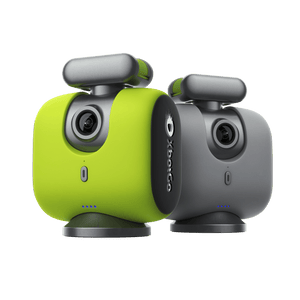
A Chameleon segue um caminho diferente para obter o mesmo resultado: transforma o telemóvel que já tem na câmara. O dispositivo consiste num suporte motorizado com um coprocessador de IA próprio — é este que faz o acompanhamento e a rotação, enquanto o seu telemóvel se encarrega da gravação.
Uma vez que o telemóvel funciona como sensor, a qualidade de imagem depende da câmara do seu equipamento. Grava até 4K nos modos de desportos coletivos, que é o utilizado no futebol. A rotação é de 360°, embora a inclinação seja mais limitada (±15°) do que na Falcon. A autonomia da bateria é a mais elevada da gama, situando-se nas 8 horas aproximadamente — uma vez que não está a efetuar a gravação.
A caixa inclui um comando Bluetooth, um pormenor mais importante do que parece: se a IA se desviar para a linha lateral, pode ajustar o enquadramento sem ter de se deslocar até ao tripé. A transmissão em direto é gratuita e ilimitada, contando com os mesmos 20GB de armazenamento na nuvem e compra única.
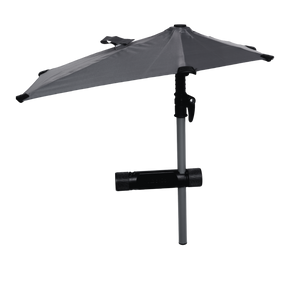
Convém saber: a ligação é feita por Bluetooth, pelo que a internet da transmissão provém do próprio telemóvel. Não possui certificação IP, pelo que foi concebida para condições normais e não para chuva intensa — o acessório de guarda-chuva de proteção contra intempéries (Weather Guard Umbrella) resolve essa questão. O acompanhamento por número de camisola e a edição automática por IA são atualmente funcionalidades do modo de basquetebol, e não de futebol.
A Trace foi concebida para uma função específica: seguir o seu jogador em vez da equipa. A sua câmara grava o campo inteiro através de uma lente fixa de 180°, e a perspetiva de seguimento é gerada posteriormente por software — a PlayerCam centra as imagens num único jogador e aplica zoom, para que os pais obtenham uma edição personalizada em vez de um plano geral da equipa.
O modelo comercial é invulgar e merece ser compreendido antes de avançar. A câmara é alugada e não comprada: os planos anuais incluem o aluguer sem custo adicional, os planos mensais cobram uma taxa de aluguer única e o equipamento é devolvido quando a subscrição termina. Os acessos (seats) são contabilizados por endereço de email e não por equipa — os planos de entrada cobram dois e os escalões superiores quatro —, pelo que um plantel acaba tipicamente por ter várias subscrições familiares em vez de uma conta de clube. O escalão de entrada mantém também apenas os seus cinco jogos mais recentes; os arquivos completos ficam disponíveis no escalão superior.
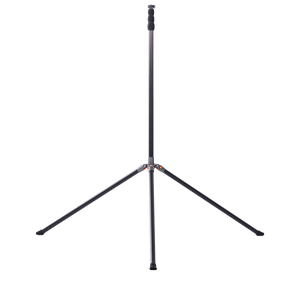
O hardware é fornecido com um tripé de 4,8 metros (16 pés), sacos de areia e uma bolsa de transporte. A Trace indica no seu próprio site que atualmente serve o mercado de futebol, com mais desportos previstos.
Se os momentos de destaque (highlights) individuais de um jogador são o seu principal objetivo, este é o sistema criado especificamente para isso.

A Veo é a câmara que tem maior probabilidade de ver já instalada num torneio de jovens competitivo. Grava o campo inteiro através de lentes duplas 4K fixas e, em seguida, gera a perspetiva de seguimento e a análise na respetiva plataforma após o jogo — ninguém a opera e não existe nenhum joystick.
A sua verdadeira força reside no que acontece após o apito final. A plataforma da Veo gere a deteção de eventos, a criação de momentos de destaque (highlights) e a partilha de clipes, que é a parte do fluxo de trabalho que a maioria dos treinadores considera mais monótona. Pode alternar ângulos, fazer zoom sobre um momento e rever jogadas em poucos cliques, sendo tudo carregado para a nuvem para o plantel.
A configuração é genuinamente pronta a usar (plug-and-play): sem cabos, basta montar e gravar. A câmara é resistente às intempéries para utilização no exterior.
O aspeto a ponderar é a estrutura de custos. A Veo funciona com uma subscrição anual da plataforma para além do hardware, pelo que vale a pena comparar o total plurianual com uma compra única — particularmente para um clube que filma todas as semanas. Convém também verificar quem detém a conta: quando um clube é proprietário da subscrição, as famílias individuais podem não conseguir descarregar as suas próprias imagens.
A Pixellot situa-se na extremidade da infraestrutura desta lista. A Air NXT é o seu modelo portátil, construído em torno de uma matriz de câmara dupla de 12MP que captura uma panorâmica e permite que a IA faça a panorâmica e o zoom no seu interior, em vez de rodar a câmara. Suporta múltiplos desportos e adiciona áudio estéreo, o que importa mais do que as pessoas esperam quando as imagens estão a ser transmitidas para as famílias em casa.
Onde se enquadra é no volume. Se estiver a cobrir um conjunto completo de jogos num recinto ou numa liga todos os fins de semana, a Pixellot foi concebida para essa escala, e muitos clubes deparam-se com ela através de um programa de uma associação distrital ou federação, em vez de a comprarem diretamente.
Onde se enquadra menos bem é para uma única família ou uma única equipa. Funciona com uma subscrição de plataforma e a experiência de visualização é construída em torno do seu próprio portal — o que é ótimo para uma liga que distribui jogos, mas menos prático para um pai que apenas quer o ficheiro. Para uma única equipa em deslocação, as câmaras autónomas acima referidas costumam ser a resposta mais simples.
A BallerCam, criada pela equipa por trás da BallerTV, é a comparação direta mais próxima da Chameleon: trata-se também de um sistema baseado em telemóvel. Uma caixa com uma lente grande angular encaixa no seu iPhone, e a IA faz a panorâmica e o zoom dentro dessa moldura fixa de 180° no software.
Há dois factos que convém conhecer de início, pois determinam se é de todo uma opção. Não inclui câmara — o iPhone é a câmara, vendida em separado. E funciona apenas com iPhone 13 Pro e modelos mais recentes, sem suporte para Android, o que representa uma porta mais restrita do que a compatibilidade com iPhone e Android da Chameleon.
O que os treinadores apreciam é o leitor web: uma vez que o campo inteiro é sempre capturado, pode desativar o seguimento da IA e fazer a panorâmica ou zoom para qualquer lugar — útil para movimentos sem bola que uma câmara de seguimento teria cortado. A caixa inclui uma ventoinha de arrefecimento, que resolve a acumulação de calor que um iPhone sofre sob luz solar direta, além de uma bateria substituível a quente (hot-swappable).
Uma especificação a ler com atenção: captura em 4K para a IA trabalhar, mas o ficheiro que descarrega é em 1080p e a transmissão é em 720p. O armazenamento na nuvem é fornecido sob a forma de um limite de horas, com mais capacidade disponível como atualização paga.
A Reeplayer resolve um problema que a maior parte desta lista ignora: muitos campos de jovens não dispõem de internet utilizável, o que torna impossível a transmissão em direto para os avós em casa. A câmara da Reeplayer possui conectividade celular integrada, com um cartão SIM e um plano de dados global incluídos, pelo que entra em direto a partir de qualquer lugar com sinal.
Grava em 4K e emite em HD 1080p, faz o acompanhamento automático, é resistente às intempéries e suporta cerca de 30 jogos armazenados internamente. A reprodução fica disponível logo após o jogo, e o plano cobre um número ilimitado de jogos, equipas e utilizadores, em vez de dividir o acesso por escalões — uma diferença genuína em relação aos sistemas que contam acessos por endereço de email.
O ponto estrutural a compreender é o modelo de custos: a câmara é uma compra de hardware única e é obrigatório contratar um plano de serviço adicional. Assim, ao contrário de uma câmara de compra única, o custo contínuo mantém-se; ao contrário de um aluguer puro, também paga o hardware adiantado. A compensação depende do número de equipas que partilham a mesma unidade — e a partilha é o cenário onde apresenta o melhor desempenho.
A câmara de futebol certa depende muito menos das especificações do que de duas questões: alguém tem de a operar e o custo cessa quando é efetuado o pagamento?
Se pretende que a câmara funcione sozinha e que o custo termine na compra, a Falcon é a resposta mais completa aqui apresentada. Se já possui um bom telemóvel e prefere gastar menos, a Chameleon leva-o a meio caminho. Se a sua prioridade é um único jogador em vez da equipa, a Trace foi criada exatamente para isso; e se pretende a plataforma de análise pós-jogo mais desenvolvida, a Veo continua a ser o padrão dos clubes.
Independentemente do caminho que escolher, o que vale a pena recuperar são os noventa minutos que passa atualmente atrás de um visor. Para saber mais sobre a categoria em geral, consulte a nossa visão geral sobre câmaras de seguimento automático para desporto.